<?xml version="1.0" encoding="utf-8"?><feed xmlns="http://www.w3.org/2005/Atom" ><generator uri="https://jekyllrb.com/" version="4.4.1">Jekyll</generator><link href="https://la-bohe.me/feed.xml" rel="self" type="application/atom+xml" /><link href="https://la-bohe.me/" rel="alternate" type="text/html" /><updated>2026-10-18T14:05:11+00:00</updated><id>https://la-bohe.me/feed.xml</id><title type="html">La bohème</title><subtitle>한스 블로그.</subtitle><author><name>haanss</name></author><entry><title type="html">[Apple] 애플 스마트 홈의 새로운 허브, ‘애플 홈뷰(HomeView)’ 전격 공개 및 한국 출시 정보</title><link href="https://la-bohe.me/241/" rel="alternate" type="text/html" title="[Apple] 애플 스마트 홈의 새로운 허브, ‘애플 홈뷰(HomeView)’ 전격 공개 및 한국 출시 정보" /><published>2026-10-17T08:00:00+00:00</published><updated>2026-10-17T08:00:00+00:00</updated><id>https://la-bohe.me/241</id><content type="html" xml:base="https://la-bohe.me/241/"><![CDATA[<p>안녕하세요 <strong>한스</strong>입니다.<br />
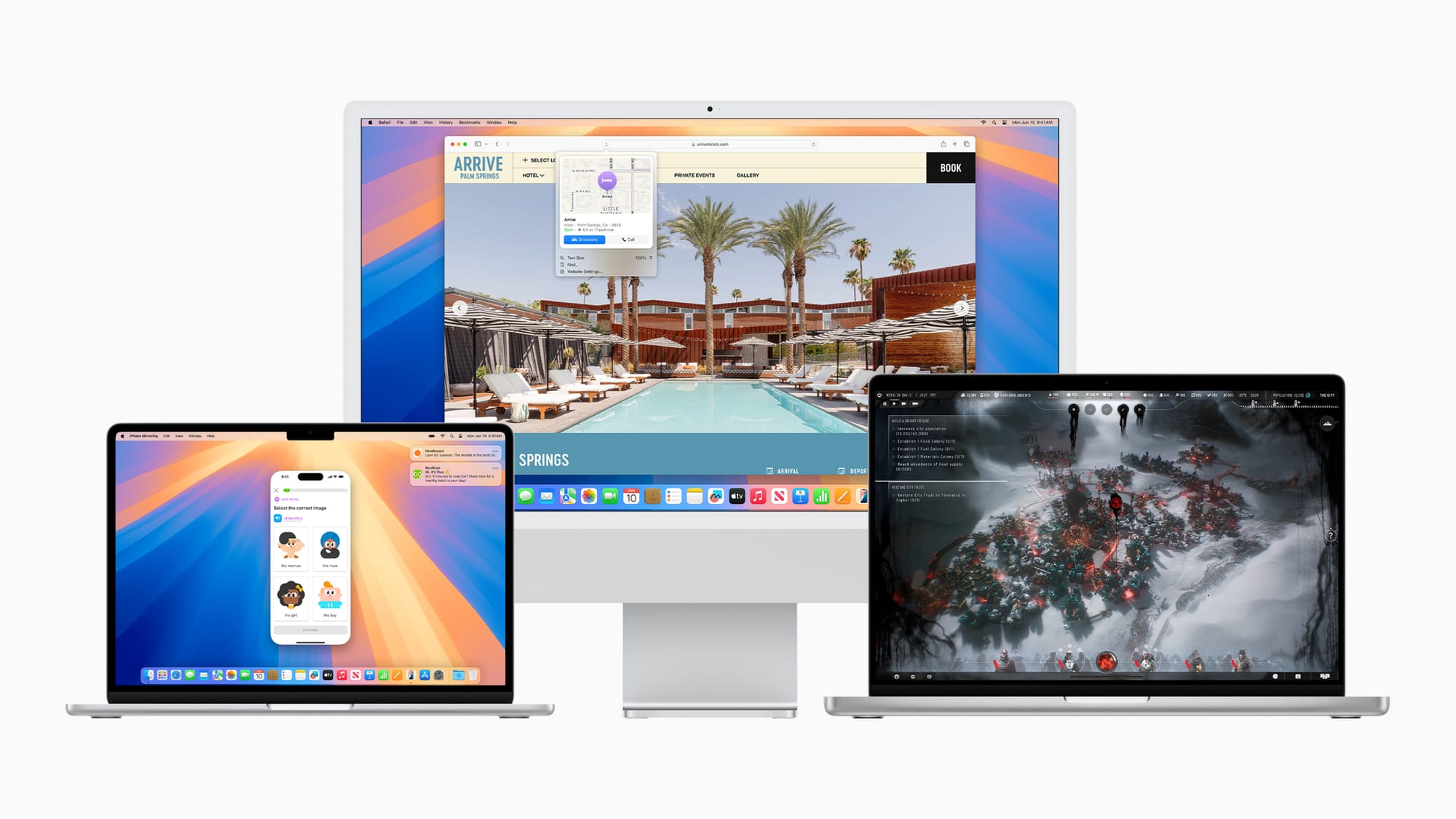
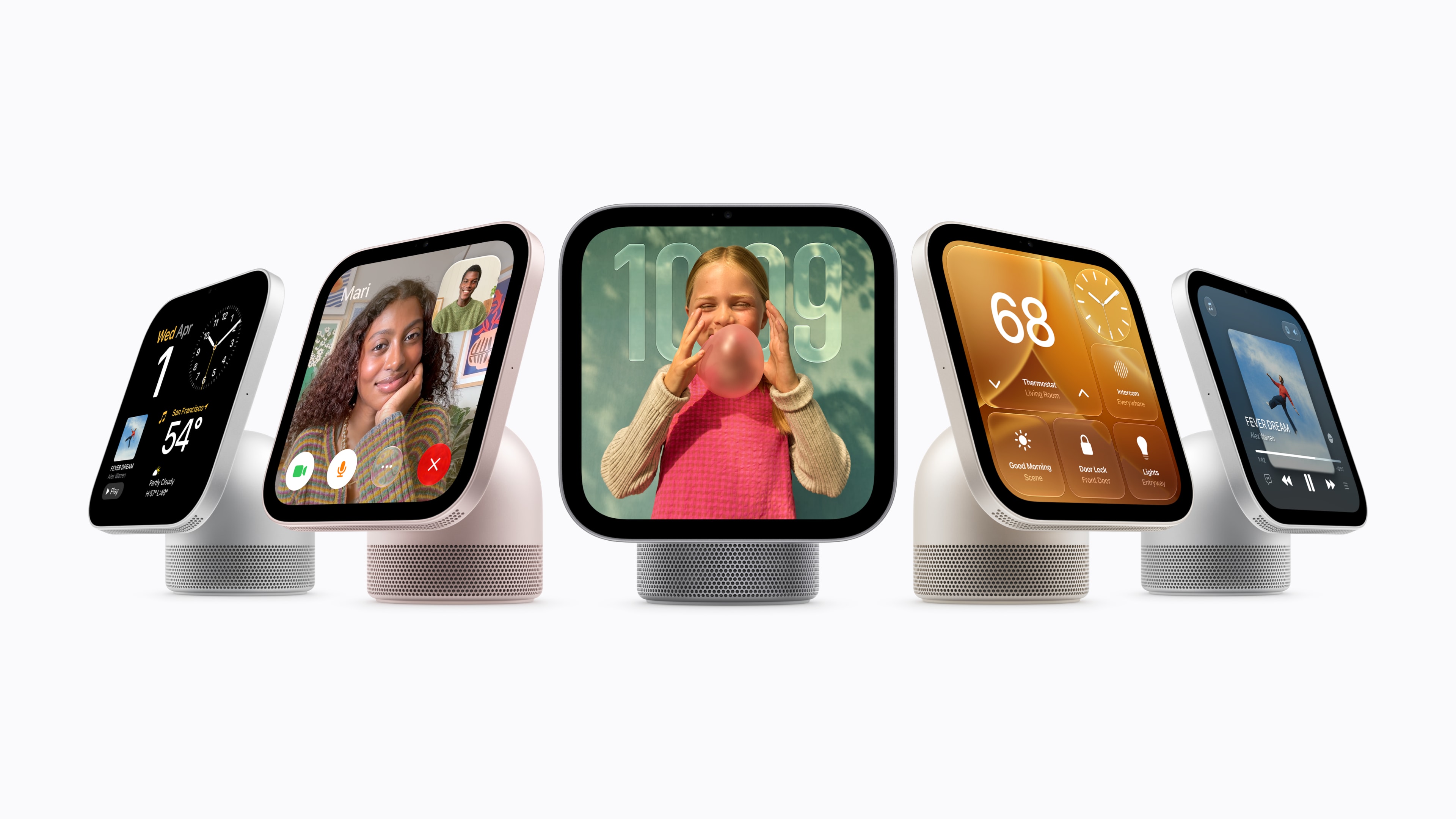
애플(Apple)이 2026년 가을, 집 안의 엔터테인먼트와 스마트 홈 관리를 혁신적으로 바꿔줄 완전히 새로운 폼팩터의 기기인 <strong>‘애플 홈뷰(Apple HomeView)’</strong>를 전격 공개했습니다. 이번에 발표된 애플 홈뷰는 온 가족이 거실이나 주방에서 공유하는 스마트 홈 허브이면서도, 기기 앞에 선 사용자를 인식해 완벽하게 개인화된 경험을 제공하는 것이 가장 큰 특징입니다. 우리 집의 새로운 중심이 될 애플 홈뷰의 주요 기능과 특징, 그리고 많은 분이 궁금해하시는 한국 출시 일정에 대해 자세히 알아보겠습니다.</p>

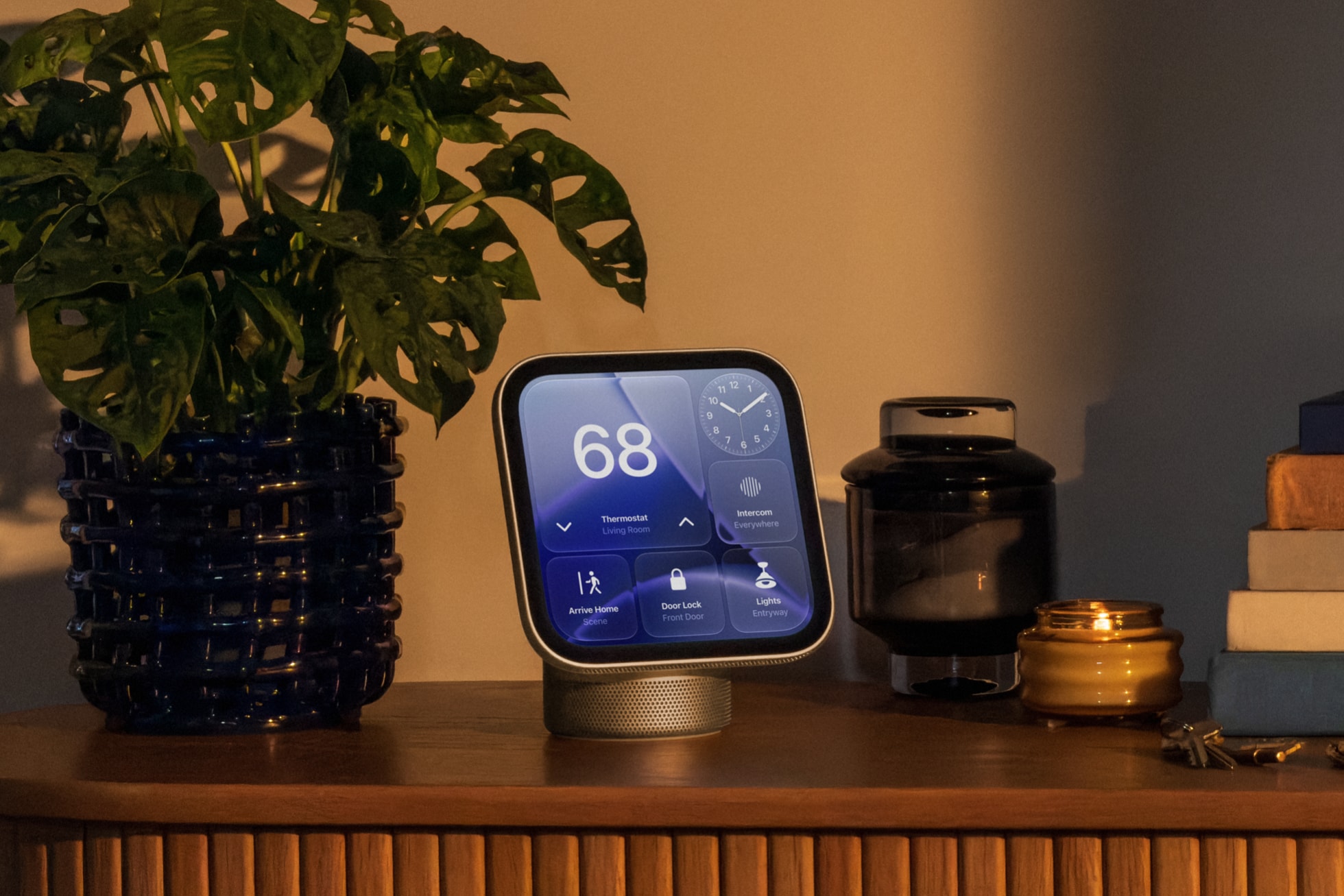
<p><img src="/assets/images/241/img.jpg" alt="Apple HomeView 디스플레이" /></p>

<h2 id="애플-홈뷰apple-homeview의-핵심-매력-3가지">애플 홈뷰(Apple HomeView)의 핵심 매력 3가지</h2>

<h3 id="1-공간에-자연스럽게-스며드는-우아한-디자인-스탠드형벽걸이형">1. 공간에 자연스럽게 스며드는 우아한 디자인 (스탠드형/벽걸이형)</h3>

<p>애플 홈뷰는 집 안 어디에서든 선명하고 생생한 화면을 제공하는 7인치 Liquid Retina 디스플레이를 탑재했습니다. 특히 사용자의 주거 환경과 활용 목적에 맞게 두 가지 형태로 출시된 점이 눈에 띕니다.</p>

<ul>
  <li><strong>스탠드형(Tabletop):</strong> 부드럽게 화면 기울기를 조절할 수 있는 스테인리스 스틸 힌지가 적용되어 있어 주방 식탁이나 침대 협탁 어디에 두어도 편안한 시야각을 제공합니다. (실버, 스타라이트, 로즈 핑크, 스페이스 그레이 색상 제공)</li>
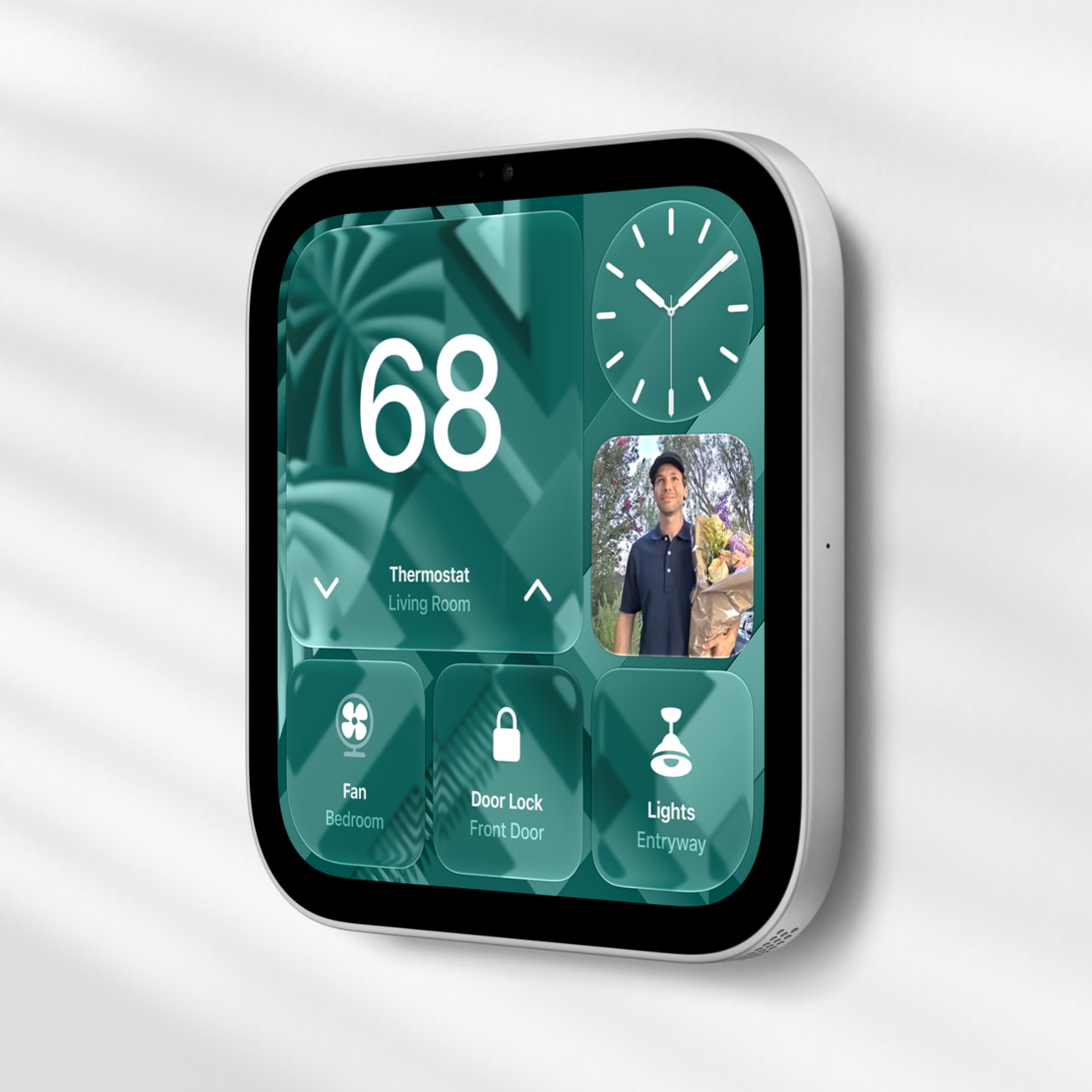
  <li><strong>벽걸이형(Wall-mounted):</strong> 현관이나 복도 등 좁은 공간의 벽면에 설치하여 공간 활용도를 극대화할 수 있으며, 집안의 스마트 홈 기기들을 제어하는 메인 컨트롤 패널 역할을 훌륭하게 수행합니다.</li>
</ul>

<h3 id="2-최대-6명-안면-인식-철저하게-보호되는-맞춤형-프라이버시">2. 최대 6명 안면 인식, 철저하게 보호되는 맞춤형 프라이버시</h3>

<p>가족이 함께 사용하는 공용 기기에서 가장 중요한 것은 사생활 보호입니다. 애플 홈뷰는 다가오는 사용자의 얼굴을 스마트하게 인식하여 즉시 맞춤형 화면으로 전환합니다.</p>

<p>최대 6명의 가족 구성원을 등록할 수 있으며, 내가 화면 앞에 서면 나의 메시지, 캘린더 일정, 미리 알림 등 개인적인 정보가 나타나고, 자리를 뜨면 즉시 기본 화면으로 돌아가 프라이버시를 철저히 보호합니다. 동시에 Apple Music 공유 플레이리스트나 가족 사진 앨범 등은 누구나 쉽게 접근하여 즐길 수 있도록 설계되었습니다.</p>

<h3 id="3-apple-intelligence와-진화된-siri-ai의-만남">3. Apple Intelligence와 진화된 Siri AI의 만남</h3>

<p>기기의 심장부에는 차세대 <strong>‘Apple Intelligence’</strong>와 결합된 완전히 새로운 <strong>‘Siri AI’</strong>가 탑재되어 있습니다. 기존의 단순한 명령어 수준을 넘어, 화면의 문맥을 이해하고 사용자와 자연스러운 대화를 이어나갈 수 있습니다.</p>

<p>내 아이폰이나 아이패드와 연동하면 기기가 나의 일정을 파악하여 더욱 똑똑한 답변을 제공합니다. 디스플레이를 활용해 레시피를 보며 요리를 하거나, 영상 통화(FaceTime)를 걸고, 집 안의 조명과 온도를 음성만으로 섬세하게 제어할 수 있는 진정한 의미의 스마트 홈 비서가 탄생한 것입니다.</p>

<hr />

<h2 id="-애플-홈뷰-한국-출시일은-언제일까-현재-미정">💡 애플 홈뷰 한국 출시일은 언제일까? (현재 미정)</h2>

<p>새로운 혁신 기기인 만큼 국내 도입을 기다리시는 분들이 많지만, 아쉽게도 <strong>애플 홈뷰의 한국 출시는 현재 미정</strong>인 상태입니다.</p>

<p>미국 등 1차 출시국의 경우 2026년 10월 13일 사전 예약을 시작으로 11월 13일에 정식 출시가 이루어지지만, 한국 출시가 지연되는 데에는 몇 가지 이유가 예상됩니다.</p>

<ol>
  <li><strong>Apple Intelligence 및 Siri 한국어 최적화:</strong> 애플 홈뷰의 핵심은 맥락을 이해하는 고도화된 AI 비서 기능입니다. 완벽한 한국어 인식과 로컬라이제이션(현지화)을 적용하기 위한 추가적인 학습 및 개발 시간이 필요할 것으로 보입니다.</li>
  <li><strong>전파 인증 및 국내 스마트홈 연동 규격:</strong> 새로운 무선 통신 기기인 만큼 국내 전파 인증 절차를 거쳐야 하며, 국내 IoT 및 스마트 홈 기기(월패드 등) 파트너사들과의 호환성 테스트 기간이 소요될 수 있습니다.</li>
</ol>

<p>과거 HomePod(홈팟)의 국내 출시가 다소 늦어졌던 선례를 고려할 때, 한국어 지원 업데이트 일정에 맞춰 <strong>내년 상반기 이후</strong>에나 정식 출시 관련 소식을 기대해 볼 수 있을 것 같습니다. 국내 출시일이나 사전 예약 관련 새로운 정보가 업데이트되는 대로 빠르게 소식 전해드리겠습니다.</p>

<p>오늘도 방문해 주셔서 감사합니다!</p>]]></content><author><name>haanss</name></author><category term="IT" /><category term="Apple" /><category term="애플" /><category term="홈뷰" /><category term="HomeView" /><category term="스마트홈" /><summary type="html"><![CDATA[안녕하세요 **한스** 입니다. 애플(Apple)이 집 안의 엔터테인먼트와 스마트 홈 관리를 혁신적으로 바꿔줄 새로운 기기인 '애플 홈뷰(Apple HomeView)'를 전격 공개했습니다. 온 가족이 공유하는 홈 허브이면서도 완벽한 개인화 경험을 제공하는 새로운 폼팩터를 소개합니다.]]></summary></entry><entry><title type="html">[Apple] 애플 스마트 홈의 새로운 허브, ‘애플 홈뷰(HomeView)’ 전격 공개 및 한국 출시 정보</title><link href="https://la-bohe.me/241/" rel="alternate" type="text/html" title="[Apple] 애플 스마트 홈의 새로운 허브, ‘애플 홈뷰(HomeView)’ 전격 공개 및 한국 출시 정보" /><published>2026-10-17T08:00:00+00:00</published><updated>2026-10-17T08:00:00+00:00</updated><id>https://la-bohe.me/241_</id><content type="html" xml:base="https://la-bohe.me/241/"><![CDATA[<p>안녕하세요 <strong>한스</strong>입니다.<br />
애플(Apple)이 2026년 가을, 집 안의 엔터테인먼트와 스마트 홈 관리를 혁신적으로 바꿔줄 완전히 새로운 폼팩터의 기기인 <strong>‘애플 홈뷰(Apple HomeView)’</strong>를 전격 공개했습니다. 이번에 발표된 애플 홈뷰는 온 가족이 거실이나 주방에서 공유하는 스마트 홈 허브이면서도, 기기 앞에 선 사용자를 인식해 완벽하게 개인화된 경험을 제공하는 것이 가장 큰 특징입니다. 우리 집의 새로운 중심이 될 애플 홈뷰의 주요 기능과 특징, 그리고 많은 분이 궁금해하시는 한국 출시 일정에 대해 자세히 알아보겠습니다.</p>

<p><img src="/assets/images/241/img.jpg" alt="Apple HomeView 디스플레이" /></p>

<h2 id="애플-홈뷰apple-homeview의-핵심-매력-3가지">애플 홈뷰(Apple HomeView)의 핵심 매력 3가지</h2>

<h3 id="1-공간에-자연스럽게-스며드는-우아한-디자인-스탠드형벽걸이형">1. 공간에 자연스럽게 스며드는 우아한 디자인 (스탠드형/벽걸이형)</h3>

<p>애플 홈뷰는 집 안 어디에서든 선명하고 생생한 화면을 제공하는 7인치 Liquid Retina 디스플레이를 탑재했습니다. 특히 사용자의 주거 환경과 활용 목적에 맞게 두 가지 형태로 출시된 점이 눈에 띕니다.</p>

<p><img src="/assets/images/241/img_1.jpg" alt="Apple HomeView 스탠드형" /></p>
<ul>
  <li><strong>스탠드형(Tabletop):</strong> 부드럽게 화면 기울기를 조절할 수 있는 스테인리스 스틸 힌지가 적용되어 있어 주방 식탁이나 침대 협탁 어디에 두어도 편안한 시야각을 제공합니다. (실버, 스타라이트, 로즈 핑크, 스페이스 그레이 색상 제공)</li>
</ul>

<p><img src="/assets/images/241/img_4.jpg" alt="Apple HomeView 스탠드형" /></p>
<ul>
  <li><strong>벽걸이형(Wall-mounted):</strong> 현관이나 복도 등 좁은 공간의 벽면에 설치하여 공간 활용도를 극대화할 수 있으며, 집안의 스마트 홈 기기들을 제어하는 메인 컨트롤 패널 역할을 훌륭하게 수행합니다.</li>
</ul>

<h3 id="2-최대-6명-안면-인식-철저하게-보호되는-맞춤형-프라이버시">2. 최대 6명 안면 인식, 철저하게 보호되는 맞춤형 프라이버시</h3>

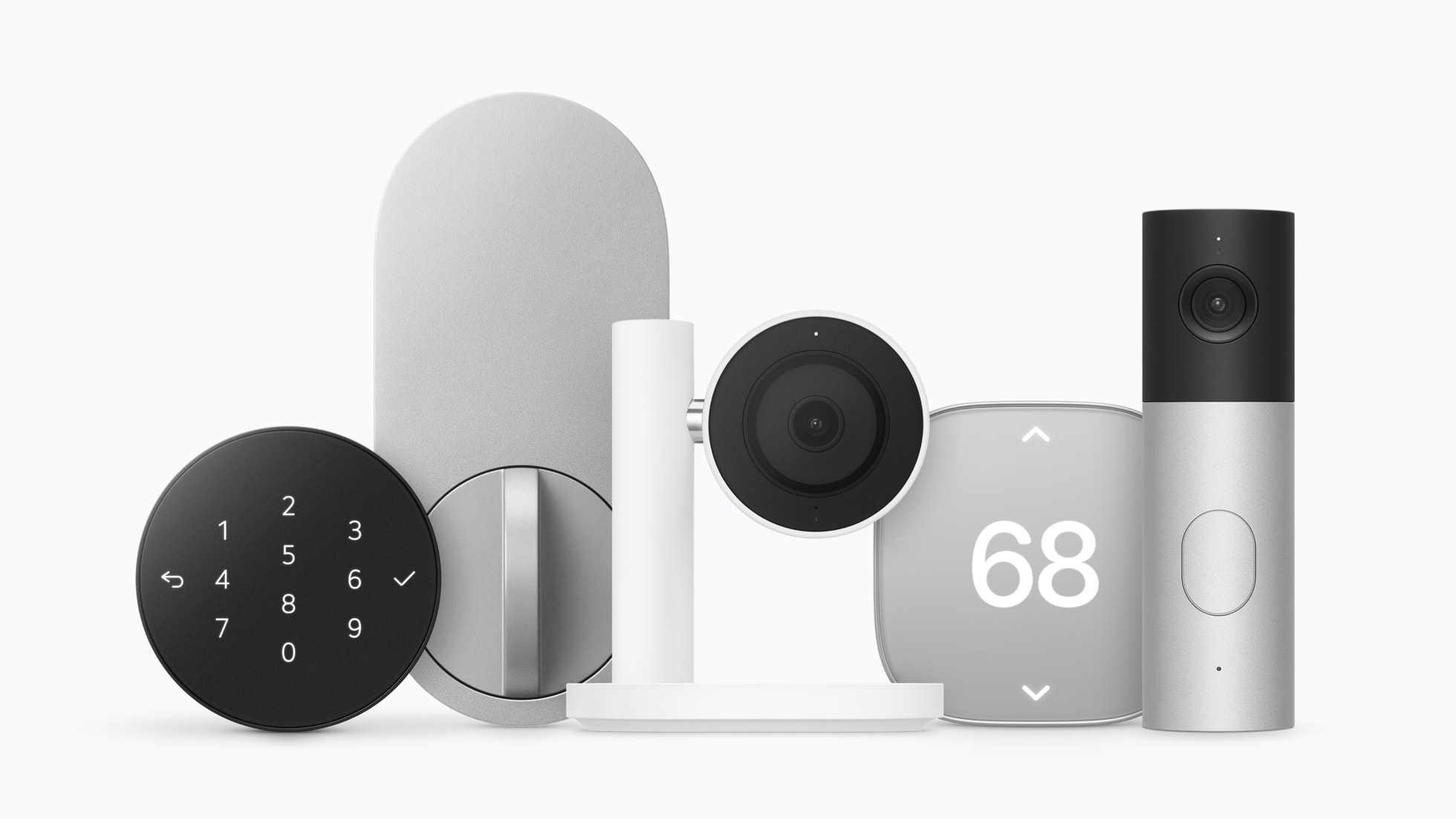
<p>가족이 함께 사용하는 공용 기기에서 가장 중요한 것은 사생활 보호입니다. 애플 홈뷰는 다가오는 사용자의 얼굴을 스마트하게 인식하여 즉시 맞춤형 화면으로 전환합니다.</p>

<p>최대 6명의 가족 구성원을 등록할 수 있으며, 내가 화면 앞에 서면 나의 메시지, 캘린더 일정, 미리 알림 등 개인적인 정보가 나타나고, 자리를 뜨면 즉시 기본 화면으로 돌아가 프라이버시를 철저히 보호합니다. 동시에 Apple Music 공유 플레이리스트나 가족 사진 앨범 등은 누구나 쉽게 접근하여 즐길 수 있도록 설계되었습니다.</p>

<p><img src="/assets/images/241/img_8.jpg" alt="Apple HomeView" /></p>

<h3 id="3-apple-intelligence와-진화된-siri-ai의-만남">3. Apple Intelligence와 진화된 Siri AI의 만남</h3>

<p>기기의 심장부에는 차세대 <strong>‘Apple Intelligence’</strong>와 결합된 완전히 새로운 <strong>‘Siri AI’</strong>가 탑재되어 있습니다. 기존의 단순한 명령어 수준을 넘어, 화면의 문맥을 이해하고 사용자와 자연스러운 대화를 이어나갈 수 있습니다.</p>

<p>내 아이폰이나 아이패드와 연동하면 기기가 나의 일정을 파악하여 더욱 똑똑한 답변을 제공합니다. 디스플레이를 활용해 레시피를 보며 요리를 하거나, 영상 통화(FaceTime)를 걸고, 집 안의 조명과 온도를 음성만으로 섬세하게 제어할 수 있는 진정한 의미의 스마트 홈 비서가 탄생한 것입니다.</p>

<hr />

<h2 id="-애플-홈뷰-한국-출시일은-언제일까-현재-미정">💡 애플 홈뷰 한국 출시일은 언제일까? (현재 미정)</h2>

<p>새로운 혁신 기기인 만큼 국내 도입을 기다리시는 분들이 많지만, 아쉽게도 <strong>애플 홈뷰의 한국 출시는 현재 미정</strong>인 상태입니다.</p>

<p>미국 등 1차 출시국의 경우 2026년 10월 13일 사전 예약을 시작으로 11월 13일에 정식 출시가 이루어지지만, 한국 출시가 지연되는 데에는 몇 가지 이유가 예상됩니다.</p>

<ol>
  <li><strong>Apple Intelligence 및 Siri 한국어 최적화:</strong> 애플 홈뷰의 핵심은 맥락을 이해하는 고도화된 AI 비서 기능입니다. 완벽한 한국어 인식과 로컬라이제이션(현지화)을 적용하기 위한 추가적인 학습 및 개발 시간이 필요할 것으로 보입니다.</li>
  <li><strong>전파 인증 및 국내 스마트홈 연동 규격:</strong> 새로운 무선 통신 기기인 만큼 국내 전파 인증 절차를 거쳐야 하며, 국내 IoT 및 스마트 홈 기기(월패드 등) 파트너사들과의 호환성 테스트 기간이 소요될 수 있습니다.</li>
</ol>

<p>과거 HomePod(홈팟)의 국내 출시가 다소 늦어졌던 선례를 고려할 때, 한국어 지원 업데이트 일정에 맞춰 <strong>내년 상반기 이후</strong>에나 정식 출시 관련 소식을 기대해 볼 수 있을 것 같습니다. 국내 출시일이나 사전 예약 관련 새로운 정보가 업데이트되는 대로 빠르게 소식 전해드리겠습니다.</p>

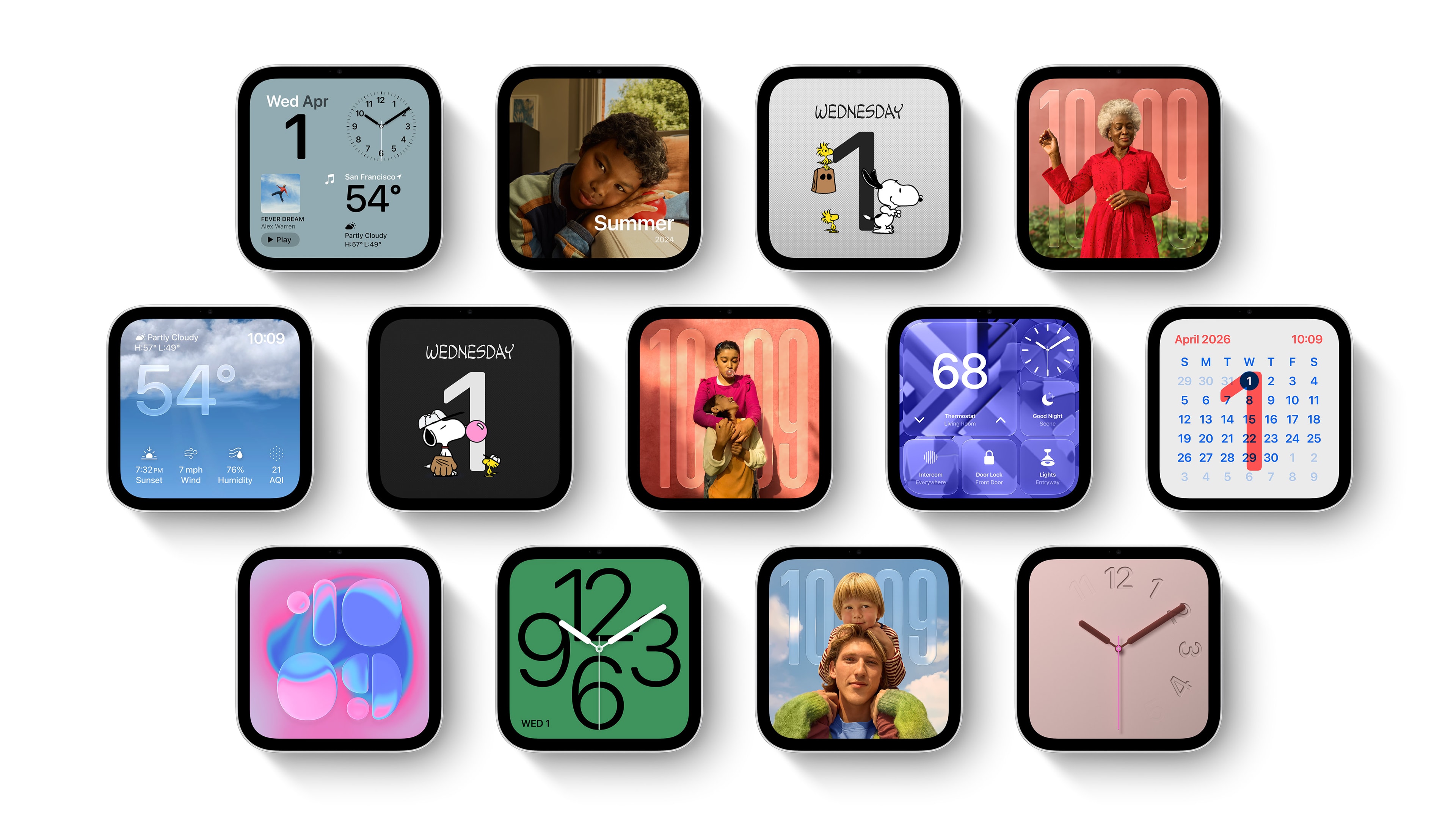
<p><img src="/assets/images/241/img_5.jpg" alt="Apple HomeView" /></p>

<h2 id="맺음말">맺음말</h2>
<p>이번 애플 홈뷰의 등장은 디스플레이가 달린 스피커 하나가 추가된 것을 넘어, 우리가 집이라는 공간과 상호작용하는 방식을 완전히 뒤바꿔놓을 것으로 기대됩니다. 페이스타임 통화, 음악 감상, 홈 모니터링은 물론, 완벽한 사생활 보호 속에서 경험하는 Apple Intelligence의 편리함까지. 우리의 일상을 더욱 윤택하게 만들어줄 이 혁신적인 기기가 무척 기다려집니다.</p>]]></content><author><name>haanss</name></author><category term="IT" /><category term="Apple" /><category term="애플" /><category term="홈뷰" /><category term="HomeView" /><category term="스마트홈" /><summary type="html"><![CDATA[애플(Apple)이 집 안의 엔터테인먼트와 스마트 홈 관리를 혁신적으로 바꿔줄 새로운 기기인 '애플 홈뷰(Apple HomeView)'를 전격 공개했습니다. 온 가족이 공유하는 홈 허브이면서도 완벽한 개인화 경험을 제공하는 새로운 폼팩터를 소개합니다.]]></summary></entry><entry><title type="html">[Apple] 애플 iOS 26 아이폰 메시지 앱 변화 3가지</title><link href="https://la-bohe.me/240/" rel="alternate" type="text/html" title="[Apple] 애플 iOS 26 아이폰 메시지 앱 변화 3가지" /><published>2025-10-18T13:52:47+00:00</published><updated>2025-10-18T13:52:47+00:00</updated><id>https://la-bohe.me/240</id><content type="html" xml:base="https://la-bohe.me/240/"><![CDATA[<p>안녕하세요 <strong>한스</strong>입니다.<br />
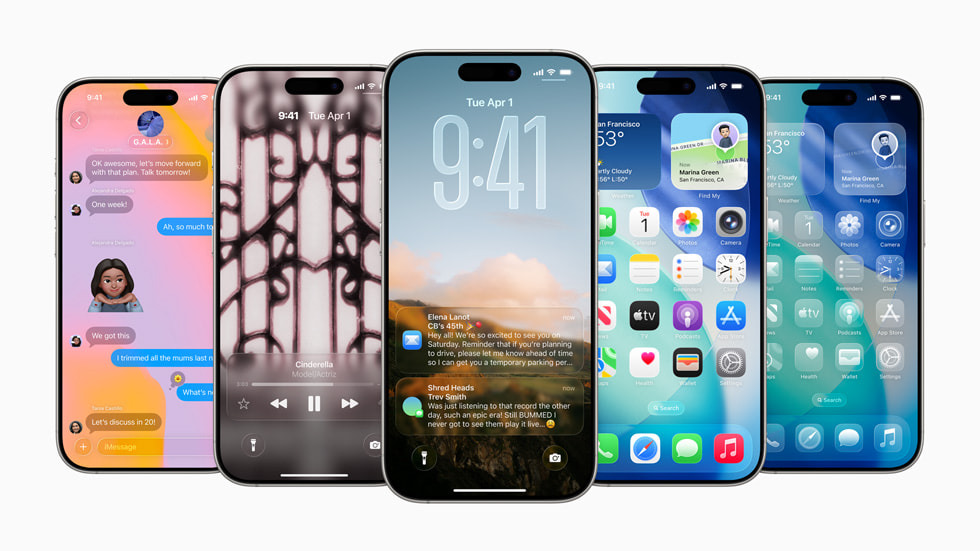
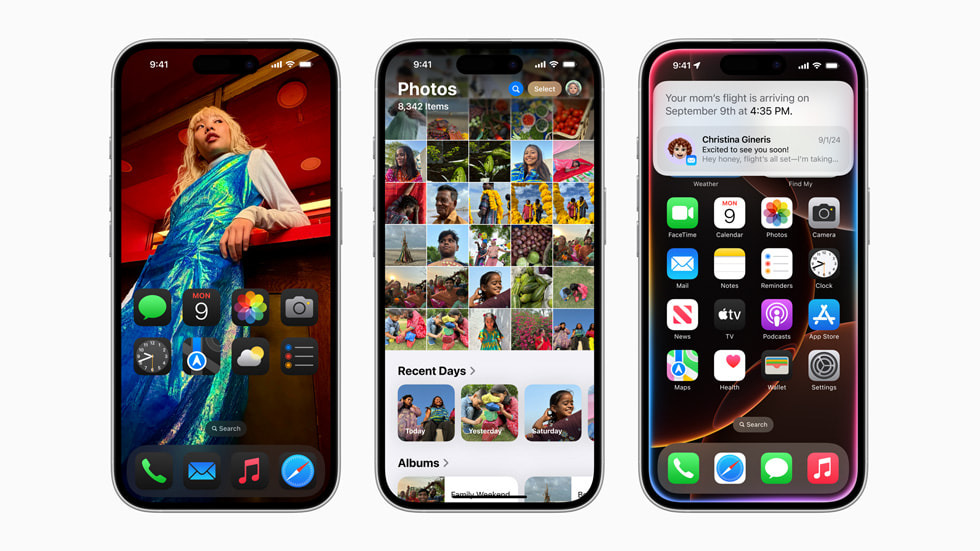
지난 2025년 6월 9일에 열린 WWDC 25에서는 리퀴드 글래스라는 특별한 디자인을 선보였는데요, 이 외에도 많은 부분에서 업데이트가 있을 예정입니다. 오늘 소개해드릴 내용은 아이폰의 메시지 앱의 변화입니다. iOS 26에서 아이폰 메시지 앱은 디자인과 기능 면에서 큰 변화를 예고하고 있습니다. iOS 26에서 아이폰 메시지 앱은 한층 진화된 기능과 새로운 디자인으로 사용자 경험을 크게 향상시켰습니다. 이번 업데이트에서 주목해야 할 세 가지 주요 변화를 소개해드리겠습니다.</p>

<p><img src="/assets/images/240/img.jpg" alt="" /></p>

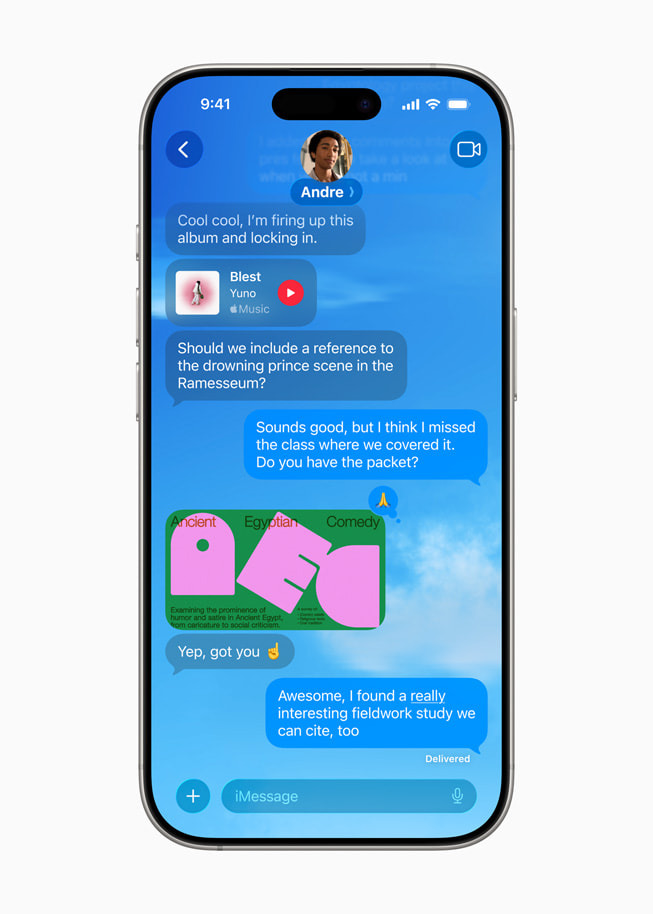
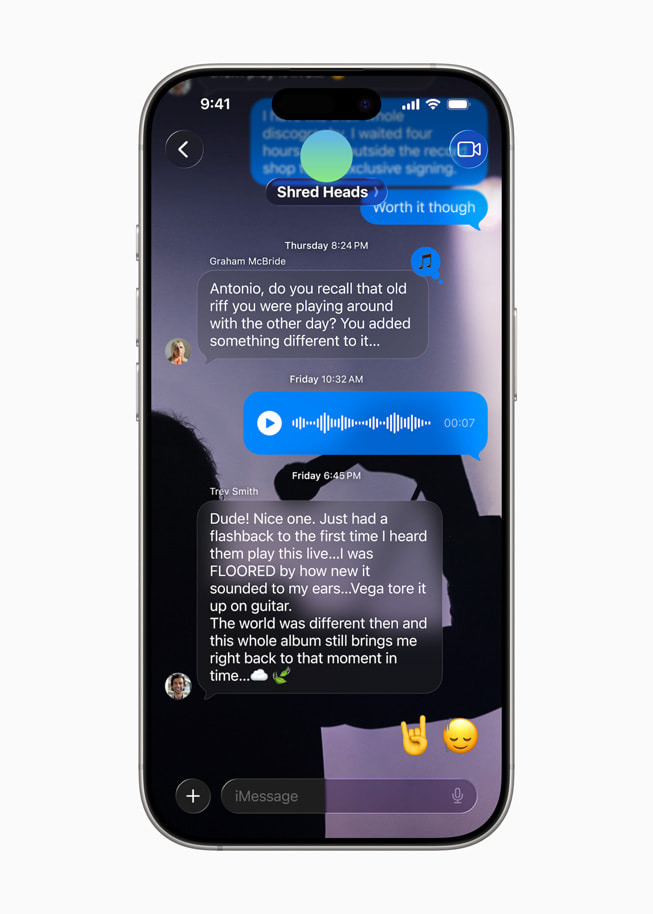
<h1 id="1-대화-배경-커스터마이즈-기능-도입">1. 대화 배경 커스터마이즈 기능 도입</h1>

<p><img src="/assets/images/240/img_1.jpg" alt="" /></p>

<p>이제 메시지 대화창의 배경을 자유롭게 꾸밀 수 있습니다.</p>

<p>애플이 제공하는 다양한 테마와 색상, 혹은 사용자가 직접 선택한 사진을 배경으로 설정할 수 있습니다.</p>

<p>상대방도 iOS 26을 사용한다면, 내가 설정한 배경이 상대방 화면에도 동일하게 적용됩니다.</p>

<p>각 대화별로 개성 있는 분위기를 연출할 수 있어, 메시지 앱이 더욱 즐거워집니다.</p>

<ol>
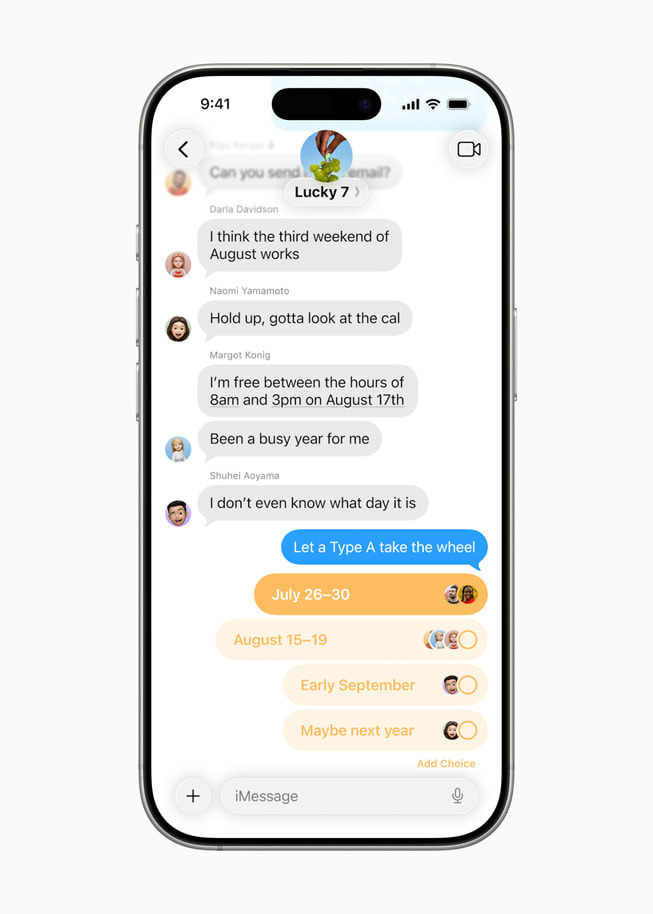
  <li>그룹 채팅 ‘설문조사’ 기능 추가</li>
</ol>

<p><img src="/assets/images/240/img_2.jpg" alt="" /></p>

<p>그룹 채팅에서 설문조사를 쉽고 빠르게 만들 수 있는 기능이 새롭게 추가되었습니다.</p>

<p>여행 일정, 모임 장소 등 다양한 주제로 투표를 진행할 수 있습니다.</p>

<p>애플 인텔리전스가 대화 맥락을 파악해 설문조사 기능을 자동으로 제안해주기도 합니다.</p>

<p>투표 현황과 결과를 실시간으로 확인할 수 있어, 그룹 의사결정이 훨씬 간편해졌습니다.</p>

<h1 id="3-실시간-번역-기능-지원">3. 실시간 번역 기능 지원</h1>

<p><img src="/assets/images/240/img_3.jpg" alt="" /></p>

<p>이제 메시지 앱에서 실시간 번역 기능이 공식 지원됩니다.</p>

<p>영어, 일본어, 중국어, 프랑스어, 한국어 등 9개 주요 언어를 자동으로 번역해주어, 언어 장벽 없이 대화가 가능합니다.</p>

<p>텍스트 메시지는 물론 오디오 메시지도 실시간으로 번역되며, 번역 과정은 아이폰 내부에서 처리되어 개인정보 보호도 강화되었습니다.</p>

<p>그룹 채팅에서도 각 사용자의 선호 언어로 메시지가 자동 번역되어 표시됩니다.</p>

<h1 id="맺음말">맺음말</h1>

<p>iOS 26 메시지 앱은 더욱 스마트하고 편리한 소통을 위한 변화로 가득합니다. 새로운 기능들을 직접 경험해보고, 한층 업그레이드된 대화의 즐거움을 느껴보시길 바랍니다. 언제나 디자인에서 앞서 나가는 애플은 이제 AI 만 따라잡으면 됩니다.</p>]]></content><author><name>haanss</name></author><category term="Tech" /><category term="애플" /><category term="아이폰" /><summary type="html"><![CDATA[2025년 6월 9일에 열린 WWDC 25 에서는 리퀴드 글래스 라는 특별한 디자인을 선보였는데요, 이 외에도 많은 부분에서 업데이트가 있을 예정입니다. 오늘 소개해드릴 내용은 아이폰 의 메시지 앱의 변화입니다. iOS 26 에서 아이폰..."]]></summary></entry><entry><title type="html">애플 WWDC 2025 주요 내용</title><link href="https://la-bohe.me/238/" rel="alternate" type="text/html" title="애플 WWDC 2025 주요 내용" /><published>2025-10-18T13:50:57+00:00</published><updated>2025-10-18T13:50:57+00:00</updated><id>https://la-bohe.me/238</id><content type="html" xml:base="https://la-bohe.me/238/"><![CDATA[<p>안녕하세요 <strong>한스</strong>입니다</p>

<p>2025년 6월 9일(현지시각), 애플의 연례 개발자 행사인 WWDC25가 막을 올렸습니다. 올해 WWDC는 소프트웨어와 사용자 경험(UI)의 대대적인 혁신, 그리고 인공지능(AI) 전략의 진화에 초점이 맞춰졌습니다. 하드웨어 신제품 발표는 없었지만, 애플 생태계 전반에 걸친 디자인 변화와 AI 기능, 개발자 지원 강화가 핵심 메시지로 자리 잡았습니다.</p>

<!-- Courtesy of embedresponsively.com -->

<div class="responsive-video-container">
    <iframe src="https://www.youtube-nocookie.com/embed/0_DjDdfqtUE" title="YouTube video player" frameborder="0" webkitallowfullscreen="" mozallowfullscreen="" allowfullscreen=""></iframe>
  </div>

<!-- 파일 위치: _includes/auto-link.html -->

<!-- 1. 비어있는 카드 UI 뼈대 -->
<div class="custom-link-card auto-link-wrapper" onclick="window.open('https://www.apple.com/apple-events/', '_blank')" style="cursor: pointer;">
  <div class="link-card-image"></div>
  <div class="link-card-content">
    <div class="link-card-title">링크 정보를 불러오는 중...</div>
    <div class="link-card-desc">https://www.apple.com/apple-events/</div>
    <div class="link-card-domain"></div>
  </div>
</div>

<!-- 2. 정보를 긁어오는 자바스크립트 로직 -->
<script>
  (function() {
    const targetUrl = "https://www.apple.com/apple-events/";
    const currentScript = document.currentScript;
    const cardElement = currentScript.previousElementSibling;
    
    const titleEl = cardElement.querySelector('.link-card-title');
    const descEl = cardElement.querySelector('.link-card-desc');
    const imgEl = cardElement.querySelector('.link-card-image');
    const domainEl = cardElement.querySelector('.link-card-domain');

    try {
      domainEl.innerText = new URL(targetUrl).hostname.replace('www.', '');
    } catch(e) {}

    fetch(`https://api.microlink.io?url=${encodeURIComponent(targetUrl)}`)
      .then(res => res.json())
      .then(data => {
        if(data.status === 'success') {
          const info = data.data;
          if(info.title) titleEl.innerText = info.title;
          if(info.description) descEl.innerText = info.description;
          
          if(info.image && info.image.url) {
            imgEl.style.backgroundImage = `url('${info.image.url}')`;
          } else if(info.logo && info.logo.url) {
            imgEl.style.backgroundImage = `url('${info.logo.url}')`;
          }
        } else {
          titleEl.innerText = "해당 웹사이트로 이동하기";
        }
      })
      .catch(err => {
        titleEl.innerText = "해당 웹사이트로 이동하기";
      });
  })();
</script>

<!-- 3. 링크 카드 CSS 디자인 -->
<style>
  .custom-link-card {
    display: flex;
    border: 1px solid #e1e4e8;
    border-radius: 6px;
    overflow: hidden;
    text-decoration: none !important;
    color: inherit !important;
    margin: 2rem 0;
    background-color: #ffffff;
    transition: box-shadow 0.2s ease;
    height: 192px; 
  }
  
  .custom-link-card:hover {
    box-shadow: 0 4px 12px rgba(0,0,0,0.1);
  }
  
  .link-card-image {
    width: 192px; 
    height: 192px;
    flex-shrink: 0;
    background-size: cover;
    background-position: center;
    background-color: #f6f8fa;
    border-right: 1px solid #e1e4e8;
  }
  
  .link-card-content {
    display: flex;
    flex-direction: column;
    justify-content: flex-start; /* 🌟 기존 center를 제거하고 위쪽 정렬로 변경합니다 🌟 */
    padding: 1.5rem; /* 🌟 상, 하, 좌, 우 여백을 모두 1.5rem으로 완벽하게 통일합니다 🌟 */
    overflow: hidden;
    flex: 1;
  }
  
  .link-card-title {
    font-weight: normal; 
    font-size: 1.05rem;
    line-height: 1.4; 
    margin-bottom: 0.5rem; /* 타이틀과 내용물 사이의 간격은 그대로 유지됩니다 */
    white-space: nowrap;
    overflow: hidden;
    text-overflow: ellipsis;
    color: #24292e;
  }
  
  .link-card-desc {
    font-size: 0.68rem; 
    line-height: 1.6;
    color: #586069;
    margin-bottom: 0.8rem;
    display: -webkit-box;
    -webkit-line-clamp: 2; 
    -webkit-box-orient: vertical;
    overflow: hidden;
  }
  
  .link-card-domain {
    font-size: 0.6rem; 
    color: #959da5;
    text-transform: lowercase;
    margin-top: auto; /* 🌟 남는 공간을 위쪽으로 다 밀어내서 도메인을 박스 맨 아래(1.5rem 여백 위치)에 딱 붙입니다 🌟 */
  }
  
  /* 모바일 환경 대응 */
  @media (max-width: 600px) {
    .custom-link-card {
      flex-direction: column;
      height: auto;
    }
    .link-card-image {
      width: 100%;
      height: auto;
      aspect-ratio: 1 / 1; 
      border-right: none;
      border-bottom: 1px solid #e1e4e8;
    }
  }
</style>

<h2 id="os-버전명-출시-연도로-통일">OS 버전명, 출시 연도로 통일</h2>

<p>가장 눈에 띄는 변화 중 하나는 운영체제(OS) 버전 명명 방식입니다. 기존의 버전 번호 대신, 앞으로는 출시 연도를 반영한 이름을 사용합니다. 이에 따라 iOS 26, iPadOS 26, macOS 26, watchOS 26, tvOS 26, visionOS 26 등으로 통일되었습니다. 이로써 플랫폼 간 버전 차이로 인한 혼란이 줄어들고, 사용자와 개발자 모두에게 더 직관적인 경험을 제공하게 되었습니다.</p>

<h2 id="리퀴드-글래스디자인-전-제품군-적용">리퀴드 글래스 디자인, 전 제품군 적용</h2>

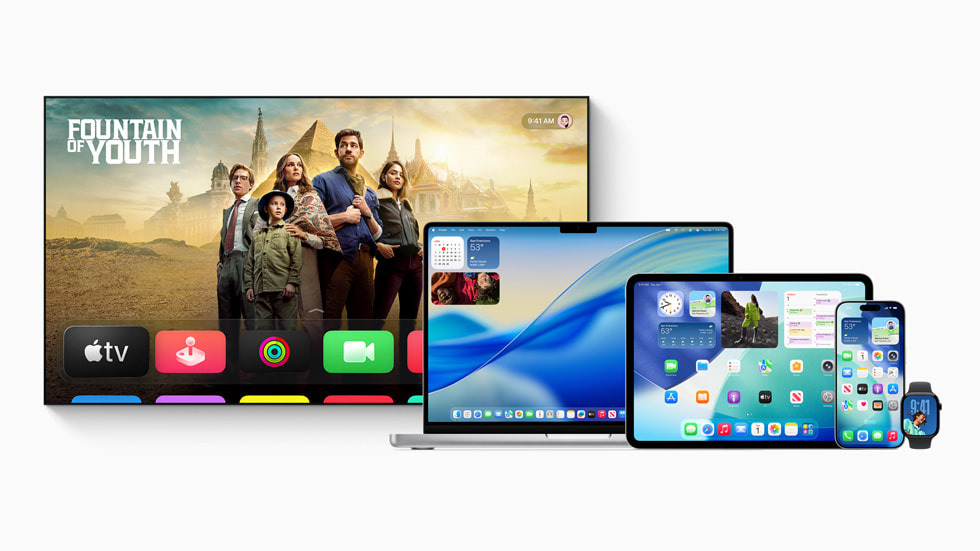
<p><img src="/assets/images/238/img.jpg" alt="" /></p>

<p>이번 WWDC의 가장 큰 화두는 ‘리퀴드 글래스(Liquid Glass)’라는 새로운 디자인입니다. visionOS에서 영감을 받은 유리처럼 투명하고 매끈한 질감이 특징으로, 잠금화면, 홈화면, 앱 아이콘, 도크, 툴바, 버튼 등 거의 모든 디자인 요소에 적용됩니다. 사용자는 앱 아이콘의 색상 테마를 직접 선택할 수 있고, 버튼과 툴바는 배경의 밝기에 따라 자동으로 라이트/다크 모드가 전환됩니다. 이러한 디자인 개편은 iPhone, iPad, Mac, Apple Watch 등 모든 기기에서 일관된 경험을 제공합니다.</p>

<h2 id="apple-intelligence-온디바이스-ai로-일상-혁신">Apple Intelligence: 온디바이스 AI로 일상 혁신</h2>

<p>애플은 올해 WWDC에서 ‘Apple Intelligence’라는 인공지능 브랜드를 선보였습니다. Apple Intelligence는 글쓰기, 이미지 생성, 시각 지능, 사진 검색, 메일·알림·메모 요약 등 다양한 기능을 제공합니다. 특히, 온디바이스(기기 내) LLM(대형 언어모델) 지원으로 오프라인 환경에서도 AI 기능을 사용할 수 있고, 개인정보 보호도 한층 강화됐습니다. 개발자를 위한 Apple Intelligence API도 공개되어, 앞으로 더 많은 앱에서 AI 기능을 활용할 수 있을 전망입니다.</p>

<p>Siri 역시 더 자연스럽고 유용하게 진화했습니다. 사용자의 맥락을 인지해 더욱 똑똑한 답변과 추천을 제공하며, 지원 언어도 확대될 예정입니다.</p>

<h2 id="실시간-번역-이미지-생성-등-다양한-신기능">실시간 번역, 이미지 생성 등 다양한 신기능</h2>

<p>실시간 번역: 메시지, 페이스타임, 전화 앱에 AI 기반 실시간 번역 기능이 추가되었습니다. 메시지 앱에서는 텍스트가 자동 번역되고, 전화 앱에서는 음성 번역, 페이스타임에서는 실시간 자막이 지원됩니다.</p>

<p>카메라 및 에어팟 연동: 에어팟을 탭해 아이폰이나 아이패드로 사진을 촬영할 수 있는 기능이 추가됐고, 소음이 많은 환경에서도 고품질 음성 녹음이 가능합니다.</p>

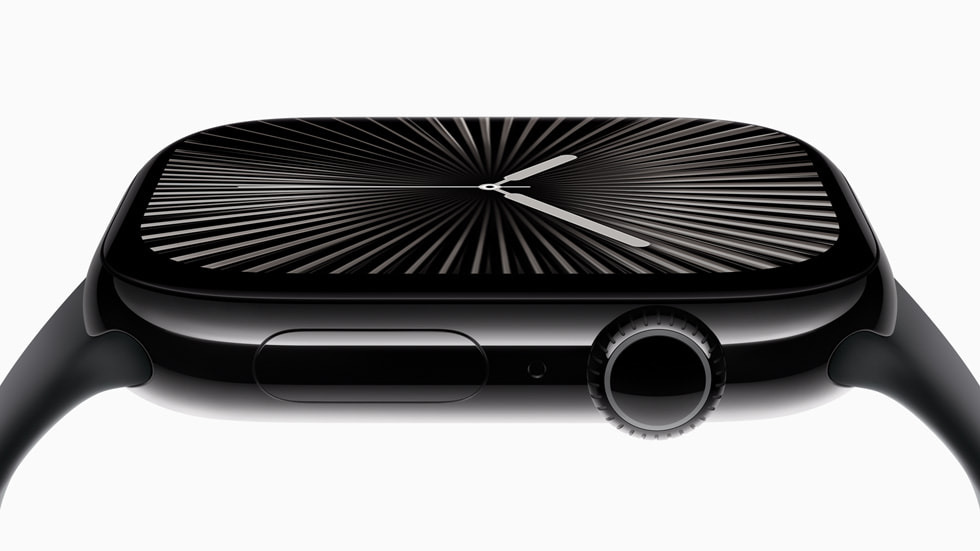
<p>워치OS 26: ‘손목 튕기기’ 제스처로 알림을 해제할 수 있고, AI 기반 운동 친구 기능이 새롭게 도입되었습니다.</p>

<p>iOS 26 전화 앱: 즐겨찾기와 최근 기록이 한 화면에 통합되었고, AI가 통화 내용을 요약해줍니다. 모르는 번호로 걸려온 전화에 자동 응답을 보내는 통화 스크리닝 기능도 추가되었습니다.</p>

<h2 id="사용자와-개발자-반응">사용자와 개발자 반응</h2>

<p>사용자들은 대대적인 디자인 변화와 AI 기능 내장에 대한 기대감을 보이고 있습니다. 다만, 하드웨어 신제품 부재와 AI 혁신 속도에 대한 아쉬움도 일부 존재합니다. 개발자들은 통합된 디자인 언어와 새로운 개발 툴, 온디바이스 AI 활용에 긍정적인 반응을 보이고 있습니다.</p>

<h2 id="맺음말">맺음말</h2>

<p>WWDC 2025는 소프트웨어 혁신과 AI 내재화, 사용자 경험 일관성에 방점을 찍었습니다. 애플은 프라이버시 중심의 온디바이스 AI와 리퀴드 글래스라는 새로운 디자인으로 차별화를 시도하며, 앞으로 애플 생태계의 경쟁력을 더욱 강화할 것으로 보입니다. 하드웨어 혁신이 다소 부족하다는 평가도 있지만, 이번 행사는 소프트웨어 중심 전략의 전환점으로 기록될 것입니다.</p>]]></content><author><name>haanss</name></author><category term="Tech" /><summary type="html"><![CDATA[안녕하세요 **한스** 입니다 2025년 6월 9일(현지시각), 애플의 연례 개발자 행사인 WWDC25 가 막을 올렸습니다. 올해 WWDC는 소프트웨어와 사용자 경험(UI)의 대대적인 혁신, 그리고 인공지능(AI) 전략의 진화에 초점이 맞춰졌습니다. 하드웨어 신제품 발표는 ...]]></summary></entry><entry><title type="html">[Apple] 애플 WWDC25 세계개발자회의 2025년 6월 9일 개최</title><link href="https://la-bohe.me/234/" rel="alternate" type="text/html" title="[Apple] 애플 WWDC25 세계개발자회의 2025년 6월 9일 개최" /><published>2025-10-16T15:45:31+00:00</published><updated>2025-10-16T15:45:31+00:00</updated><id>https://la-bohe.me/234</id><content type="html" xml:base="https://la-bohe.me/234/"><![CDATA[<p>안녕하세요 <strong>한스</strong>입니다.<br />
Apple은 연례 세계개발자회의(WWDC)의 흥미진진한 라인업을 공개했습니다. 이번 WWDC는 6월 9일부터 13일까지 무료 온라인으로 개최됩니다. 이 행사는 전 세계 Apple 개발자 커뮤니티를 한자리에 모아 최신 Apple 도구, 기술, 기능과 관련된 통찰을 제공할 예정입니다. 행사 기간 동안 전 세계 개발자들은 Apple 엔지니어, 디자이너, 에반젤리스트와 소통할 수 있으며, 모든 Apple 제품에서 플랫폼 차별화에 기여하는 앱과 게임 개발에 도움이 될 최신 개선 사항을 알려주는 100개 이상의 세션을 시청할 수 있습니다. 또한 Apple은 6월 9일 Apple Park에서 진행되는 특별 행사에 1,000명 이상의 개발자 및 학생을 직접 초대할 예정입니다.</p>

<p><img src="/assets/images/234/img.jpg" alt="" /></p>

<h2 id="이번-wwdc25에서-기대되는-포인트3가지">이번 WWDC25에서 기대되는 포인트3가지</h2>

<h3 id="1-ios-7급-대규모-디자인-변화와-전-플랫폼-디자인-통일">1. iOS 7급 대규모 디자인 변화와 전 플랫폼 디자인 통일</h3>

<p>이번 WWDC25에서는 2013년 iOS 7 이후 가장 큰 규모의 시각적 변화가 예상됩니다. iOS, iPadOS, macOS, watchOS, tvOS, visionOS 등 애플의 모든 운영체제에 걸쳐 디자인 일관성이 강화되며, Vision Pro의 visionOS에서 영감을 받은 투명하고 유리 같은 UI 요소가 전반적으로 적용될 전망입니다. 앱 아이콘 디자인도 원형으로 통일되는 등, 전반적인 사용자 경험이 새롭게 재정립될 것으로 기대됩니다.</p>

<h3 id="2-apple-intelligence-기반의-ai-혁신">2. Apple Intelligence 기반의 AI 혁신</h3>

<p>애플은 이번 WWDC25에서 ‘Apple Intelligence’로 명명된 새로운 AI 기술을 전면에 내세울 예정입니다. 대규모 언어 모델(LLM) 기반의 Siri 개선, 맥락을 이해하는 자연스러운 대화, 복잡한 작업 처리 등 AI가 OS 전반에 깊이 통합됩니다. AI 배터리 관리, 실시간 내비게이션 요약, 자동 요약 생성, 스마트 일정 관리 등 다양한 AI 기능이 기본 탑재될 것으로 보입니다. 개발자들도 AI 기능을 활용할 수 있는 새로운 소프트웨어 개발 키트와 프레임워크가 공개될 전망입니다.</p>

<h3 id="3-모든-주요-os-및-하드웨어의-동시-업그레이드">3. 모든 주요 OS 및 하드웨어의 동시 업그레이드</h3>

<p>iOS 19, iPadOS 19, macOS 16, watchOS 12, tvOS 19, visionOS 3 등 애플의 모든 주요 소프트웨어 플랫폼이 동시에 대규모로 업그레이드됩니다. 특히 iPadOS의 멀티태스킹, macOS의 인터페이스 통합, watchOS의 건강 모니터링, visionOS의 상호작용 등 각 플랫폼별 핵심 기능 개선이 예고되어 있습니다. 또한, M3 칩 기반의 신형 Mac Studio, 실시간 언어 번역이 가능한 AirPods Pro 3 등 하드웨어 신제품도 함께 공개될 가능성이 높습니다.</p>

<p>이처럼 WWDC25는 디자인 혁신, AI 통합, 플랫폼·하드웨어 대개편이라는 세 가지 측면에서 애플 생태계의 미래를 가늠할 중요한 분기점이 될 것으로 기대됩니다.</p>

<h2 id="apple-키노트">Apple 키노트</h2>

<p>WWDC25는 6월 9일 오전 10시(미국 쿠퍼티노 현지 시각)에 Apple 플랫폼에 선보일 획기적인 업데이트의 첫선을 보이며 막을 엽니다. 키노트 발표는 apple.com, Apple TV 앱, Apple YouTube 채널에서 라이브 스트리밍으로 시청할 수 있습니다. 스트리밍 종료 후에는 온디맨드 영상으로도 재생할 수 있습니다.</p>

<h2 id="platforms-state-of-the-union">Platforms State of the Union</h2>

<p>키노트 발표에 이어 6월 9일 오후 1시(미국 쿠퍼티노 현지 시각)에는 Platforms State of the Union이 진행됩니다. 이 세션에서는 발전한 iOS, iPadOS, macOS, tvOS, visionOS, watchOS와 더불어 Apple 개발자에게 힘을 실어줄 새로운 도구를 더욱 심도 있게 소개합니다. Platforms State of the Union은 Apple Developer 앱, 웹사이트, Apple Developer YouTube 채널에서 스트리밍되며, 종료 후 온디맨드 영상으로도 시청할 수 있습니다.</p>

<h2 id="영상-세션-및-가이드">영상 세션 및 가이드</h2>

<p>WWDC25에서는 100개 이상의 세션이 준비되어 있습니다. 개발자들은 Apple 전문가와 함께 최신 기술 및 프레임워크를 심층 탐구할 수 있습니다. 세션은 Apple Developer 앱, 웹사이트, YouTube 채널에서 시청할 수 있습니다. 개발자들은 또한 회의의 가장 중요한 발표 및 핵심 내용을 정리한 가이드 및 문서를 이용할 수 있습니다.</p>

<h2 id="전문가와의-그룹-및-일대일-랩-세션">전문가와의 그룹 및 일대일 랩 세션</h2>

<p>Apple Developer Program 회원 및 Apple Developer Enterprise Program 회원은 온라인 그룹 랩 및 일대일 예약을 통해 Apple 전문가와 직접 만날 수 있습니다. 개발자들은 그룹 랩 세션에 참여해 회의 주간의 중요한 발표 사항을 실시간으로 파악하거나, 온라인 예약을 통해 Apple Intelligence, 디자인, 개발자 도구, 그래픽 및 게임, 머신 러닝, Swift 등 다양한 주제에 관한 가이드를 받을 수 있습니다. Apple 엔지니어 및 디자이너는 Apple Developer Forums에서도 만날 수 있습니다.</p>

<h2 id="swift-student-challenge">Swift Student Challenge</h2>

<p>Apple은 차세대 기업가, 코딩 전문가, 디자이너를 장려하는 수많은 Apple 프로그램 중 하나인 Swift Student Challenge를 통해 개발자를 지원하는 일에 자부심을 가지고 있습니다. 작년에 이어, 뛰어난 결과물을 출품한 50명의 우수 수상자는 3일간 Apple Park에 초청되어 특별한 활동에 참가합니다.</p>

<p>개발자들은 WWDC25 웹사이트, Apple Developer 앱, Apple Developer 웹사이트, Apple Developer YouTube 채널의 모든 WWDC 콘텐츠를 이용할 수 있습니다.</p>

<!-- 파일 위치: _includes/auto-link.html -->

<!-- 1. 비어있는 카드 UI 뼈대 -->
<div class="custom-link-card auto-link-wrapper" onclick="window.open('https://www.apple.com/kr/newsroom/2025/05/apples-worldwide-developers-conference-kicks-off-june-9/', '_blank')" style="cursor: pointer;">
  <div class="link-card-image"></div>
  <div class="link-card-content">
    <div class="link-card-title">링크 정보를 불러오는 중...</div>
    <div class="link-card-desc">https://www.apple.com/kr/newsroom/2025/05/apples-worldwide-developers-conference-kicks-off-june-9/</div>
    <div class="link-card-domain"></div>
  </div>
</div>

<!-- 2. 정보를 긁어오는 자바스크립트 로직 -->
<script>
  (function() {
    const targetUrl = "https://www.apple.com/kr/newsroom/2025/05/apples-worldwide-developers-conference-kicks-off-june-9/";
    const currentScript = document.currentScript;
    const cardElement = currentScript.previousElementSibling;
    
    const titleEl = cardElement.querySelector('.link-card-title');
    const descEl = cardElement.querySelector('.link-card-desc');
    const imgEl = cardElement.querySelector('.link-card-image');
    const domainEl = cardElement.querySelector('.link-card-domain');

    try {
      domainEl.innerText = new URL(targetUrl).hostname.replace('www.', '');
    } catch(e) {}

    fetch(`https://api.microlink.io?url=${encodeURIComponent(targetUrl)}`)
      .then(res => res.json())
      .then(data => {
        if(data.status === 'success') {
          const info = data.data;
          if(info.title) titleEl.innerText = info.title;
          if(info.description) descEl.innerText = info.description;
          
          if(info.image && info.image.url) {
            imgEl.style.backgroundImage = `url('${info.image.url}')`;
          } else if(info.logo && info.logo.url) {
            imgEl.style.backgroundImage = `url('${info.logo.url}')`;
          }
        } else {
          titleEl.innerText = "해당 웹사이트로 이동하기";
        }
      })
      .catch(err => {
        titleEl.innerText = "해당 웹사이트로 이동하기";
      });
  })();
</script>

<!-- 3. 링크 카드 CSS 디자인 -->
<style>
  .custom-link-card {
    display: flex;
    border: 1px solid #e1e4e8;
    border-radius: 6px;
    overflow: hidden;
    text-decoration: none !important;
    color: inherit !important;
    margin: 2rem 0;
    background-color: #ffffff;
    transition: box-shadow 0.2s ease;
    height: 192px; 
  }
  
  .custom-link-card:hover {
    box-shadow: 0 4px 12px rgba(0,0,0,0.1);
  }
  
  .link-card-image {
    width: 192px; 
    height: 192px;
    flex-shrink: 0;
    background-size: cover;
    background-position: center;
    background-color: #f6f8fa;
    border-right: 1px solid #e1e4e8;
  }
  
  .link-card-content {
    display: flex;
    flex-direction: column;
    justify-content: flex-start; /* 🌟 기존 center를 제거하고 위쪽 정렬로 변경합니다 🌟 */
    padding: 1.5rem; /* 🌟 상, 하, 좌, 우 여백을 모두 1.5rem으로 완벽하게 통일합니다 🌟 */
    overflow: hidden;
    flex: 1;
  }
  
  .link-card-title {
    font-weight: normal; 
    font-size: 1.05rem;
    line-height: 1.4; 
    margin-bottom: 0.5rem; /* 타이틀과 내용물 사이의 간격은 그대로 유지됩니다 */
    white-space: nowrap;
    overflow: hidden;
    text-overflow: ellipsis;
    color: #24292e;
  }
  
  .link-card-desc {
    font-size: 0.68rem; 
    line-height: 1.6;
    color: #586069;
    margin-bottom: 0.8rem;
    display: -webkit-box;
    -webkit-line-clamp: 2; 
    -webkit-box-orient: vertical;
    overflow: hidden;
  }
  
  .link-card-domain {
    font-size: 0.6rem; 
    color: #959da5;
    text-transform: lowercase;
    margin-top: auto; /* 🌟 남는 공간을 위쪽으로 다 밀어내서 도메인을 박스 맨 아래(1.5rem 여백 위치)에 딱 붙입니다 🌟 */
  }
  
  /* 모바일 환경 대응 */
  @media (max-width: 600px) {
    .custom-link-card {
      flex-direction: column;
      height: auto;
    }
    .link-card-image {
      width: 100%;
      height: auto;
      aspect-ratio: 1 / 1; 
      border-right: none;
      border-bottom: 1px solid #e1e4e8;
    }
  }
</style>]]></content><author><name>haanss</name></author><category term="Tech" /><category term="애플" /><category term="WWDC" /><summary type="html"><![CDATA[안녕하세요 **한스** 입니다. Apple 은 연례 세계개발자회의(WWDC)의 흥미진진한 라인업을 공개했습니다. 이번 WWDC 는 6월 9일 부터 13일 까지 무료 온라인 으로 개최됩니다. 이 행사는 전 세계 Apple 개발자 커뮤니티 를 한자리에 모아 최신 Apple 도구...]]></summary></entry><entry><title type="html">애플 아이폰 iOS 18 업데이트 출시</title><link href="https://la-bohe.me/87/" rel="alternate" type="text/html" title="애플 아이폰 iOS 18 업데이트 출시" /><published>2025-09-11T14:24:19+00:00</published><updated>2025-09-11T14:24:19+00:00</updated><id>https://la-bohe.me/87</id><content type="html" xml:base="https://la-bohe.me/87/"><![CDATA[<p>지금까지 가장 개성 넘치며 유능한 iPhone을 위한 iOS 18 이 출시되었습니다. 이번 iOS 18 의 주요 내용을 요약해드리겠습니다.</p>

<p><img src="/assets/images/87/img.jpg" alt="" /></p>

<h1 id="개인화-및-사용자-경험-향상">개인화 및 사용자 경험 향상</h1>

<p>iOS 18은 iPhone을 더욱 개인화되고 강력하게 만드는 다양한 기능을 제공합니다.</p>

<p>향상된 Siri</p>

<p>자연스러운 대화가 가능해졌으며, 여러 작업을 연속해서 수행할 수 있습니다.</p>

<p>사용자의 음성을 15초만 학습하면 Siri가 사용자의 목소리로 말할 수 있게 되었습니다.</p>

<p>개선된 자동 수정 기능</p>

<p>문맥을 더 잘 이해하여 정확한 단어 제안과 문장 완성을 제공합니다.</p>

<h1 id="커뮤니케이션-기능-강화">커뮤니케이션 기능 강화</h1>

<p>메시지 앱 업데이트</p>

<p>새로운 스티커 기능으로 대화를 더욱 표현력 있게 만들 수 있습니다.</p>

<p>검색 기능이 개선되어 원하는 내용을 빠르게 찾을 수 있습니다.</p>

<p>FaceTime 개선</p>

<p>부재 중 통화에 대해 음성 또는 비디오 메시지를 남길 수 있습니다.</p>

<h1 id="생산성-및-편의성-향상">생산성 및 편의성 향상</h1>

<p>AirDrop 업그레이드</p>

<p>NameDrop 기능으로 기기를 가까이 대기만 해도 연락처를 쉽게 공유할 수 있습니다.</p>

<p>건강 앱 확장</p>

<p>감정과 마음 건강을 추적하는 새로운 기능이 추가되었습니다.</p>

<p>지도 앱 개선</p>

<p>오프라인 지도를 다운로드하여 인터넷 연결 없이도 내비게이션을 사용할 수 있습니다.</p>

<h1 id="보안-및-개인정보-보호-강화">보안 및 개인정보 보호 강화</h1>

<p>민감한 사진을 숨기고 잠글 수 있는 기능이 추가되었습니다[1].</p>

<p>개인정보 보호 기능이 전반적으로 강화되었습니다[1].</p>

<p>iOS 18은 이러한 다양한 기능과 개선사항을 통해 iPhone 사용자들에게 더욱 개인화되고 강력한 경험을 제공합니다.</p>

<p>출처</p>

<!-- 파일 위치: _includes/auto-link.html -->

<!-- 1. 비어있는 카드 UI 뼈대 -->
<div class="custom-link-card auto-link-wrapper" onclick="window.open('https://www.apple.com/kr/newsroom/2024/09/ios-18-is-available-today-making-iphone-more-personal-and-capable-than-ever/', '_blank')" style="cursor: pointer;">
  <div class="link-card-image"></div>
  <div class="link-card-content">
    <div class="link-card-title">링크 정보를 불러오는 중...</div>
    <div class="link-card-desc">https://www.apple.com/kr/newsroom/2024/09/ios-18-is-available-today-making-iphone-more-personal-and-capable-than-ever/</div>
    <div class="link-card-domain"></div>
  </div>
</div>

<!-- 2. 정보를 긁어오는 자바스크립트 로직 -->
<script>
  (function() {
    const targetUrl = "https://www.apple.com/kr/newsroom/2024/09/ios-18-is-available-today-making-iphone-more-personal-and-capable-than-ever/";
    const currentScript = document.currentScript;
    const cardElement = currentScript.previousElementSibling;
    
    const titleEl = cardElement.querySelector('.link-card-title');
    const descEl = cardElement.querySelector('.link-card-desc');
    const imgEl = cardElement.querySelector('.link-card-image');
    const domainEl = cardElement.querySelector('.link-card-domain');

    try {
      domainEl.innerText = new URL(targetUrl).hostname.replace('www.', '');
    } catch(e) {}

    fetch(`https://api.microlink.io?url=${encodeURIComponent(targetUrl)}`)
      .then(res => res.json())
      .then(data => {
        if(data.status === 'success') {
          const info = data.data;
          if(info.title) titleEl.innerText = info.title;
          if(info.description) descEl.innerText = info.description;
          
          if(info.image && info.image.url) {
            imgEl.style.backgroundImage = `url('${info.image.url}')`;
          } else if(info.logo && info.logo.url) {
            imgEl.style.backgroundImage = `url('${info.logo.url}')`;
          }
        } else {
          titleEl.innerText = "해당 웹사이트로 이동하기";
        }
      })
      .catch(err => {
        titleEl.innerText = "해당 웹사이트로 이동하기";
      });
  })();
</script>

<!-- 3. 링크 카드 CSS 디자인 -->
<style>
  .custom-link-card {
    display: flex;
    border: 1px solid #e1e4e8;
    border-radius: 6px;
    overflow: hidden;
    text-decoration: none !important;
    color: inherit !important;
    margin: 2rem 0;
    background-color: #ffffff;
    transition: box-shadow 0.2s ease;
    height: 192px; 
  }
  
  .custom-link-card:hover {
    box-shadow: 0 4px 12px rgba(0,0,0,0.1);
  }
  
  .link-card-image {
    width: 192px; 
    height: 192px;
    flex-shrink: 0;
    background-size: cover;
    background-position: center;
    background-color: #f6f8fa;
    border-right: 1px solid #e1e4e8;
  }
  
  .link-card-content {
    display: flex;
    flex-direction: column;
    justify-content: flex-start; /* 🌟 기존 center를 제거하고 위쪽 정렬로 변경합니다 🌟 */
    padding: 1.5rem; /* 🌟 상, 하, 좌, 우 여백을 모두 1.5rem으로 완벽하게 통일합니다 🌟 */
    overflow: hidden;
    flex: 1;
  }
  
  .link-card-title {
    font-weight: normal; 
    font-size: 1.05rem;
    line-height: 1.4; 
    margin-bottom: 0.5rem; /* 타이틀과 내용물 사이의 간격은 그대로 유지됩니다 */
    white-space: nowrap;
    overflow: hidden;
    text-overflow: ellipsis;
    color: #24292e;
  }
  
  .link-card-desc {
    font-size: 0.68rem; 
    line-height: 1.6;
    color: #586069;
    margin-bottom: 0.8rem;
    display: -webkit-box;
    -webkit-line-clamp: 2; 
    -webkit-box-orient: vertical;
    overflow: hidden;
  }
  
  .link-card-domain {
    font-size: 0.6rem; 
    color: #959da5;
    text-transform: lowercase;
    margin-top: auto; /* 🌟 남는 공간을 위쪽으로 다 밀어내서 도메인을 박스 맨 아래(1.5rem 여백 위치)에 딱 붙입니다 🌟 */
  }
  
  /* 모바일 환경 대응 */
  @media (max-width: 600px) {
    .custom-link-card {
      flex-direction: column;
      height: auto;
    }
    .link-card-image {
      width: 100%;
      height: auto;
      aspect-ratio: 1 / 1; 
      border-right: none;
      border-bottom: 1px solid #e1e4e8;
    }
  }
</style>]]></content><author><name>haanss</name></author><category term="Tech" /><category term="아이폰" /><category term="애플" /><summary type="html"><![CDATA[지금까지 가장 개성 넘치며 유능한 iPhone을 위한 iOS 18 이 출시되었습니다. 이번 iOS 18 의 주요 내용을 요약해드리겠습니다. 개인화 및 사용자 경험 향상 iOS 18은 iPhone을 더욱 개인화되고 강력하게 만드는 다양한 기능을 제공합니다. 향상된 Sir...]]></summary></entry><entry><title type="html">애플 키노트 2024 요약 아이폰16 애플 인텔리전스 신제품 발표</title><link href="https://la-bohe.me/83/" rel="alternate" type="text/html" title="애플 키노트 2024 요약 아이폰16 애플 인텔리전스 신제품 발표" /><published>2025-09-11T14:15:21+00:00</published><updated>2025-09-11T14:15:21+00:00</updated><id>https://la-bohe.me/83</id><content type="html" xml:base="https://la-bohe.me/83/"><![CDATA[<p>안녕하세요 한스입니다.<br />
2024년 9월 10일 애플의 9월 키노트가 발표되었습니다. 이번 키노트에서는 애플워치10를 시작으로 에어팟4, 아이폰16 시리즈,  애플 인텔리전스를 발표했습니다. 이번에는 아이폰 16의 1차 출시국에 한국도 포함이 되었는데요, 2024년 9월 13일부터 예약을 받으며, 9월 20일에 제품을 받게 됩니다. 아이폰 16 프로에는 전자 감응식 카메라 버튼이 추가되며, 카메라의 다양한 기능을 사용할 수 있으며, 아날로그 감성 마저 느끼게 만들었습니다. 오늘은 아이폰16 시리즈를 비롯한 신제품 발표를 요약해드리겠습니다.</p>

<p><img src="/assets/images/83/img.png" alt="" /></p>

<h2 id="2024-애플-이벤트-9월-키노트">2024 애플 이벤트 9월 키노트</h2>

<!-- Courtesy of embedresponsively.com -->

<div class="responsive-video-container">
    <iframe src="https://www.youtube-nocookie.com/embed/uarNiSl_uh4" title="YouTube video player" frameborder="0" webkitallowfullscreen="" mozallowfullscreen="" allowfullscreen=""></iframe>
  </div>

<h2 id="애플워치-시리즈-10">애플워치 시리즈 10</h2>

<p><img src="/assets/images/83/img.jpg" alt="" /></p>

<p>애플이 새로운 Apple Watch Series 10을 공개했습니다. 주요 특징은 다음과 같습니다:</p>

<p>1. 디자인 및 크기:<br />
- 역대 가장 얇은 Apple Watch (이전 모델 대비 약 10% 얇아짐)<br />
- 42mm와 46mm 크기로 출시<br />
- 알루미늄 케이스는 최대 10%, 티타늄 케이스는 약 20% 가벼워짐</p>
<ol>
  <li>디스플레이:<br />
- Apple Watch 사상 가장 크고 진보된 디스플레이<br />
- 와이드 앵글 OLED 디스플레이 적용<br />
- 비스듬한 각도에서 화면 밝기 40% 향상</li>
  <li>성능:<br />
- 새로운 S10 SiP 칩셋과 4코어 Neural Engine 탑재<br />
- 더 빠른 급속 충전 기능 (15분 충전으로 최대 8시간 사용 가능)</li>
  <li>새로운 기능:<br />
- 수심 게이지와 수온 센서 탑재<br />
- 내장 스피커를 통한 오디오 재생 가능<br />
- 음성 분리 기술로 통화 품질 개선</li>
  <li>소재 및 색상:<br />
- 알루미늄: 새로운 제트 블랙, 로즈 골드, 실버<br />
- 티타늄: 내추럴, 골드, 슬레이트 (스테인리스 스틸 대체)</li>
  <li>가격 및 출시:<br />
- 가격: 599,000원부터<br />
- 사전 주문: 9월 9일부터<br />
- 출시일: 9월 20일</li>
  <li>watchOS 11:<br />
- 새로운 조수 앱, 활력 징후 앱, 훈련량 기능 등 추가</li>
</ol>

<p>Apple Watch Series 10은 더 얇고 가벼워진 디자인, 향상된 디스플레이, 새로운 센서와 기능들로 사용자 경험을 개선하고 있습니다.</p>

<h2 id="애플워치-울트라-2">애플워치 울트라 2</h2>

<p><img src="/assets/images/83/img_1.jpg" alt="" /></p>

<p>애플이 새로운 Apple Watch Ultra 2를 공개했습니다. 주요 특징은 다음과 같습니다:</p>

<p>1. 새로운 블랙 티타늄 마감 옵션 추가<br />
- 5등급 티타늄에 다이아몬드와 같은 탄소 증착법 코팅 적용<br />
- 95% 재활용 티타늄 사용</p>
<ol>
  <li>새로운 티타늄 밀레니즈 루프 밴드 출시<br />
- 최초의 Apple Watch Ultra용 메탈 밴드<br />
- 내추럴 또는 블랙 티타늄 옵션 제공</li>
  <li>향상된 기능<br />
- 3000 니트 밝기의 디스플레이 (Apple 제품 중 가장 밝음)<br />
- 정밀 이중 주파수 GPS 탑재<br />
- 최대 36시간 배터리 사용 시간 (저전력 모드 시 72시간)</li>
  <li>watchOS 11 새 기능<br />
- 활력 징후 앱, 훈련량 기능, 조수 앱 등 추가<br />
- 동작 버튼 사용자화 옵션 확대</li>
  <li>다양한 스포츠 및 아웃도어 활동 지원 강화<br />
- 달리기, 사이클링, 수영, 하이킹, 다이빙, 골프 등</li>
  <li>새로운 Apple Watch Hermès Ultra 2 모델 출시</li>
</ol>

<p><img src="/assets/images/83/img_2.jpg" alt="" /></p>

<p>7. 가격 및 출시 정보<br />
- 가격: 1,149,000원부터<br />
- 사전 주문: 9월 9일부터<br />
- 출시일: 9월 20일</p>

<p>Apple Watch Ultra 2는 더욱 다양한 디자인 옵션과 향상된 기능으로 운동 선수와 모험가들을 위한 최고의 스마트워치로 자리매김하고 있습니다.</p>

<h2 id="에어팟-4에어팟-맥스">에어팟 4/에어팟 맥스</h2>

<p><img src="/assets/images/83/img_3.jpg" alt="" /></p>

<p>새로운 AirPods 4와 AirPods Max 공개</p>

<p>1. AirPods 4<br />
- 완전히 새로운 디자인으로 편안한 착용감 제공<br />
- 기본 모델과 액티브 노이즈 캔슬링(ANC) 모델 두 가지로 출시<br />
- H2 칩 탑재로 음질 향상 및 스마트 기능 추가<br />
- USB-C 충전 지원, 배터리 사용 시간 최대 30시간<br />
- 가격: 기본 모델 199,000원, ANC 모델 269,000원</p>
<ol>
  <li>AirPods Max<br />
- 미드나이트, 스타라이트, 블루, 퍼플, 오렌지 등 새로운 색상 추가<br />
- USB-C 충전 지원<br />
- 가격: 769,000원</li>
  <li>환경 친화적 설계<br />
- 재활용 소재 사용 확대<br />
- 100% 섬유 기반 포장재 사용<br />
- 포장 부피 30% 이상 축소</li>
  <li>출시 일정<br />
- 사전 주문: 9월 9일부터<br />
- 정식 출시: 9월 20일 금요일</li>
  <li>추가 혜택<br />
- Apple Music 신규 구독자 6개월 무료 이용<br />
- AppleCare+ 서비스 제공</li>
</ol>

<p>새로운 AirPods 라인업은 향상된 음질, 편의성, 그리고 환경 친화적 설계를 강조하고 있습니다.</p>

<h2 id="아이폰-16-프로-라인업">아이폰 16 프로 라인업</h2>

<p><img src="/assets/images/83/img_7.jpg" alt="아이폰 16 프로" /></p>

<p><img src="/assets/images/83/img_8.jpg" alt="아이폰 16 프로 색상" /></p>

<p>애플이 새로운 iPhone 16 Pro와 iPhone 16 Pro Max를 공개했습니다. 주요 특징은 다음과 같습니다:</p>

<p>1. 디스플레이:<br />
- iPhone 16 Pro: 15.9cm<br />
- iPhone 16 Pro Max: 17.4cm (iPhone 사상 가장 큰 디스플레이)<br />
- 더 얇아진 베젤</p>
<ol>
  <li>새로운 A18 Pro 칩:<br />
- 업계 최고 수준의 CPU 성능<br />
- 향상된 전력 효율성<br />
- 16코어 Neural Engine</li>
  <li>카메라 시스템:<br />
- 새로운 ’카메라 컨트롤’ 기능 도입<br />
- 48MP Fusion 카메라 (120fps 4K Dolby Vision 지원)<br />
- 48MP 울트라 와이드 카메라<br />
- 5배 망원 카메라</li>
  <li>오디오:<br />
- 4개의 스튜디오급 마이크<br />
- 공간 음향 캡처 지원<br />
- ’오디오 믹스’ 기능</li>
  <li>Apple Intelligence:<br />
- 개인화된 AI 기능<br />
- 개선된 Siri 기능</li>
  <li>디자인 및 내구성:<br />
- 티타늄 디자인<br />
- Ceramic Shield 강화 유리</li>
  <li>가격 및 출시:<br />
- iPhone 16 Pro: 1,550,000원부터<br />
- iPhone 16 Pro Max: 1,900,000원부터<br />
- 사전 주문: 9월 13일<br />
- 출시: 9월 20일</li>
  <li>환경 친화적 설계:<br />
- 재활용 소재 사용 확대<br />
- 100% 재생 가능 전력으로 생산</li>
</ol>

<p>이번 iPhone 16 Pro 시리즈는 성능, 카메라, AI 기능 등 다양한 측면에서 큰 개선을 보여주고 있습니다.</p>

<h2 id="아이폰-16시리즈">아이폰 16시리즈</h2>

<p><img src="/assets/images/83/img_4.jpg" alt="" /></p>

<p>애플이 새로운 iPhone 16 및 iPhone 16 Plus를 발표했습니다. 주요 특징은 다음과 같습니다:</p>

<p>1. 새로운 A18 칩 탑재<br />
- 성능과 효율성 향상<br />
- 고사양 AAA 게임 구동 가능<br />
- 배터리 사용 시간 대폭 증가</p>
<ol>
  <li>카메라 시스템 개선<br />
- ’카메라 컨트롤’ 기능 도입<br />
- 48MP Fusion 카메라 (2배 망원 옵션 지원)<br />
- 새로운 12MP 울트라 와이드 카메라 (접사 촬영 가능)<br />
- 공간 사진 및 공간 비디오 촬영 지원</li>
  <li>Apple Intelligence 도입<br />
- 개인화된 AI 기능 제공<br />
- 개인정보 보호 강화</li>
  <li>디자인 및 내구성<br />
- 새로운 색상: 블랙, 화이트, 핑크, 틸, 울트라마린<br />
- 향상된 Ceramic Shield 적용</li>
</ol>

<p><img src="/assets/images/83/img_5.jpg" alt="" /></p>

<p>5. 가격 및 출시 정보<br />
- iPhone 16: 1,250,000원부터<br />
- iPhone 16 Plus: 1,350,000원부터<br />
- 사전 주문: 9월 13일부터<br />
- 출시일: 9월 20일</p>
<ol>
  <li>환경 친화적 설계<br />
- 재활용 소재 사용 확대<br />
- 에너지 효율성 향상</li>
</ol>

<p>이번 iPhone 16 시리즈는 성능 향상, 카메라 기능 개선, AI 기능 도입 등을 통해 사용자 경험을 크게 향상시키는 것을 목표로 하고 있습니다.</p>

<h2 id="애플-인텔리전스">애플 인텔리전스</h2>

<p><img src="/assets/images/83/img_6.jpg" alt="" /></p>

<p>새로운 AI 시스템인 Apple Intelligence를 발표했습니다. 주요 내용은 다음과 같습니다:</p>

<p>1. 출시 일정:<br />
- 다음 달 iOS 18.1, iPadOS 18.1, macOS Sequoia 15.1을 통해 베타 버전으로 출시<br />
- 미국 영어로 먼저 출시, 12월에 다른 영어권 국가로 확대<br />
- 2025년에 중국어, 프랑스어, 일본어, 스페인어 등 추가 언어 지원 예정</p>
<ol>
  <li>주요 기능:<br />
- ’글쓰기 도구’: 텍스트 재작성, 교정, 요약 기능<br />
- 사진 앱 개선: 자연어 검색, ’정리’ 도구로 배경 편집<br />
- 오디오 녹음, 전사, 요약 기능 (메모 및 전화 앱)<br />
- 알림 및 이메일 요약 기능<br />
- 개선된 Siri: 자연스러운 대화, 타이핑 지원, 화면 내용 인지 능력</li>
  <li>향후 추가 기능:<br />
- Image Playground: 이미지 생성 및 편집<br />
- ChatGPT 통합: iOS, iPadOS, macOS에서 활용 가능</li>
  <li>개인정보 보호:<br />
- 대부분의 처리를 기기 내에서 수행<br />
- Private Cloud Compute로 복잡한 작업 처리<br />
- ChatGPT 사용 시 IP 주소 보호 및 요청 내용 미저장</li>
  <li>지원 기기:<br />
- iPhone 16 시리즈, iPhone 15 Pro/Pro Max<br />
- M1 칩 이후 버전의 iPad 및 Mac</li>
</ol>

<p>Apple Intelligence는 사용자 경험을 개선하고 생산성을 높이는 동시에 개인정보 보호에 중점을 둔 AI 시스템으로, 애플의 기존 제품 생태계에 깊이 통합될 예정입니다.</p>

<p>이번 애플 이벤트는 새로운 기기들의 출시와 함께 AI 기능의 강화, 카메라 성능 향상 등이 주요 포인트였습니다. 특히 한국이 1차 출시국에 포함되어 가격과 출시 일정이 함께 공개되었습니다. 이번 아이폰 16 시리즈의 1차 출시국에 한국이 포함되어 있긴하지만, 애플 인텔리전스의 사용 여부는 불투명합니다. 이번 신제품으로 AI 전쟁에 뒤늦게 참전한 애플이 혁신을 보여줄 수 있을지 기대감을 가지고 지켜봐야겠습니다.</p>

<p>출처 애플 뉴스룸</p>

<!-- 파일 위치: _includes/auto-link.html -->

<!-- 1. 비어있는 카드 UI 뼈대 -->
<div class="custom-link-card auto-link-wrapper" onclick="window.open('https://www.apple.com/kr/newsroom/', '_blank')" style="cursor: pointer;">
  <div class="link-card-image"></div>
  <div class="link-card-content">
    <div class="link-card-title">링크 정보를 불러오는 중...</div>
    <div class="link-card-desc">https://www.apple.com/kr/newsroom/</div>
    <div class="link-card-domain"></div>
  </div>
</div>

<!-- 2. 정보를 긁어오는 자바스크립트 로직 -->
<script>
  (function() {
    const targetUrl = "https://www.apple.com/kr/newsroom/";
    const currentScript = document.currentScript;
    const cardElement = currentScript.previousElementSibling;
    
    const titleEl = cardElement.querySelector('.link-card-title');
    const descEl = cardElement.querySelector('.link-card-desc');
    const imgEl = cardElement.querySelector('.link-card-image');
    const domainEl = cardElement.querySelector('.link-card-domain');

    try {
      domainEl.innerText = new URL(targetUrl).hostname.replace('www.', '');
    } catch(e) {}

    fetch(`https://api.microlink.io?url=${encodeURIComponent(targetUrl)}`)
      .then(res => res.json())
      .then(data => {
        if(data.status === 'success') {
          const info = data.data;
          if(info.title) titleEl.innerText = info.title;
          if(info.description) descEl.innerText = info.description;
          
          if(info.image && info.image.url) {
            imgEl.style.backgroundImage = `url('${info.image.url}')`;
          } else if(info.logo && info.logo.url) {
            imgEl.style.backgroundImage = `url('${info.logo.url}')`;
          }
        } else {
          titleEl.innerText = "해당 웹사이트로 이동하기";
        }
      })
      .catch(err => {
        titleEl.innerText = "해당 웹사이트로 이동하기";
      });
  })();
</script>

<!-- 3. 링크 카드 CSS 디자인 -->
<style>
  .custom-link-card {
    display: flex;
    border: 1px solid #e1e4e8;
    border-radius: 6px;
    overflow: hidden;
    text-decoration: none !important;
    color: inherit !important;
    margin: 2rem 0;
    background-color: #ffffff;
    transition: box-shadow 0.2s ease;
    height: 192px; 
  }
  
  .custom-link-card:hover {
    box-shadow: 0 4px 12px rgba(0,0,0,0.1);
  }
  
  .link-card-image {
    width: 192px; 
    height: 192px;
    flex-shrink: 0;
    background-size: cover;
    background-position: center;
    background-color: #f6f8fa;
    border-right: 1px solid #e1e4e8;
  }
  
  .link-card-content {
    display: flex;
    flex-direction: column;
    justify-content: flex-start; /* 🌟 기존 center를 제거하고 위쪽 정렬로 변경합니다 🌟 */
    padding: 1.5rem; /* 🌟 상, 하, 좌, 우 여백을 모두 1.5rem으로 완벽하게 통일합니다 🌟 */
    overflow: hidden;
    flex: 1;
  }
  
  .link-card-title {
    font-weight: normal; 
    font-size: 1.05rem;
    line-height: 1.4; 
    margin-bottom: 0.5rem; /* 타이틀과 내용물 사이의 간격은 그대로 유지됩니다 */
    white-space: nowrap;
    overflow: hidden;
    text-overflow: ellipsis;
    color: #24292e;
  }
  
  .link-card-desc {
    font-size: 0.68rem; 
    line-height: 1.6;
    color: #586069;
    margin-bottom: 0.8rem;
    display: -webkit-box;
    -webkit-line-clamp: 2; 
    -webkit-box-orient: vertical;
    overflow: hidden;
  }
  
  .link-card-domain {
    font-size: 0.6rem; 
    color: #959da5;
    text-transform: lowercase;
    margin-top: auto; /* 🌟 남는 공간을 위쪽으로 다 밀어내서 도메인을 박스 맨 아래(1.5rem 여백 위치)에 딱 붙입니다 🌟 */
  }
  
  /* 모바일 환경 대응 */
  @media (max-width: 600px) {
    .custom-link-card {
      flex-direction: column;
      height: auto;
    }
    .link-card-image {
      width: 100%;
      height: auto;
      aspect-ratio: 1 / 1; 
      border-right: none;
      border-bottom: 1px solid #e1e4e8;
    }
  }
</style>]]></content><author><name>haanss</name></author><category term="Tech" /><category term="애플" /><category term="애플" /><summary type="html"><![CDATA[안녕하세요 한스 입니다. 2024년 9월 10일 애플의 9월 키노트가 발표되었습니다. 이번 키노트에서는 애플워치10 를 시작으로 에어팟4 , 아이폰16 시리즈 , 애플 인텔리전스 를 발표했습니다. 이번에는 아이폰 16의 1차 출시국에 한국도 포함이 되었는데요, 2024...]]></summary></entry><entry><title type="html">[Apple] 애플 WWDC24 초대장이 도착했습니다.</title><link href="https://la-bohe.me/39/" rel="alternate" type="text/html" title="[Apple] 애플 WWDC24 초대장이 도착했습니다." /><published>2025-09-08T15:07:37+00:00</published><updated>2025-09-08T15:07:37+00:00</updated><id>https://la-bohe.me/39</id><content type="html" xml:base="https://la-bohe.me/39/"><![CDATA[<h2 id="애플wwdc246월-개최-예정">애플WWDC246월 개최 예정</h2>

<p><img src="/assets/images/39/img.jpg" alt="" /></p>

<p>Apple은 연례행사인 세계개발자회의(WWDC)를 2024년 6월 10일부터 14일까지 온라인으로 개최한다고 발표했습니다. 개최일에는 Apple Park에서 개발자와 학생을 위한 특별 대면 행사도 진행됩니다.<br />
모든 개발자가 무료로 참여할 수 있는 WWDC24는 최신 iOS, iPadOS, macOS, watchOS, tvOS 및 visionOS의 눈부신 발전을 집중 조명할 예정입다. WWDC24는 개발자가 더 나은 앱과 게임을 만들 수 있도록 지원하기 위해 Apple이 매진하고 있는 헌신의 일환으로 Apple 전문가와의 특별한 만남과 더불어 새로운 도구, 프레임워크, 기능에 대한 인사이트를 제공하고 있습니다.</p>

<p>Apple의 월드와이드 디벨로퍼 릴레이션 담당 부사장인 수전 프레스콧(Susan Prescott)은 “WWDC24를 통해 기술과 커뮤니티 활동으로 가득할 특별한 한 주를 보내며 전 세계 개발자들과 소통할 생각에 무척 기대된다”며, “WWDC는 새로운 아이디어를 공유하고 혁신적인 도구와 리소스를 제공해 놀라운 개발자들이 더욱 놀라운 결과물을 만들 수 있도록 도울 것”이라고 밝혔습니다.</p>

<p>개발자와 학생은 키노트를 통해 Apple의 최신 소프트웨어와 기술을 발견할 수 있으며, 한 주 동안 Apple Developer app, Apple Developer website 및 YouTube를 통해 WWDC24를 경험할 수 있다. 올해 컨퍼런스에는 동영상 세션과 더불어 Apple 디자이너, 엔지니어가 전 세계 개발자 커뮤니티와 소통하는 시간이 마련될 예정입니다.</p>

<p>6월 10일에 열리는 WWDC24 대면 행사에 참가하는 개발자는 Apple Park에서 키노트를 시청하고 Apple 팀원을 만날 수 있을 뿐 아니라, 특별 활동에도 참여할 수 있다. 해당 대면 행사는 제한된 인원만 참석 가능하며, 신청 관련 세부 정보는 Apple Developer 웹사이트 및 앱에서 확인할 수 있습니다.</p>

<p>Apple은 차세대 개발자, 크리에이터, 기업인을 장려하는 수많은 Apple 프로그램 중 하나인 Swift Student Challenge를 통해 차세대 개발자를 지원하는 일에 자부심을 가지고 있다. 올해의 지원자에게는 3월 28일에 결과가 안내될 예정이며, 수상자는 신청을 통해 Apple Park에서 열리는 대면 행사에 참석할 수 있습니다. 또한, 뛰어난 결과물을 출품한 50명의 우수 수상자는 쿠퍼티노로 초청을 받아 3일간 진행되는 행사에 참여할 기회가 주어집니다.</p>

<p>Apple은 WWDC24 개최 전 관련 추가 정보를 Apple Developer 앱 및 Apple Developer 웹사이트에서 공유할 예정입니다.</p>

<!-- 파일 위치: _includes/auto-link.html -->

<!-- 1. 비어있는 카드 UI 뼈대 -->
<div class="custom-link-card auto-link-wrapper" onclick="window.open('https://www.apple.com/kr/newsroom/2024/03/apples-worldwide-developers-conference-returns-june-10-2024/', '_blank')" style="cursor: pointer;">
  <div class="link-card-image"></div>
  <div class="link-card-content">
    <div class="link-card-title">링크 정보를 불러오는 중...</div>
    <div class="link-card-desc">https://www.apple.com/kr/newsroom/2024/03/apples-worldwide-developers-conference-returns-june-10-2024/</div>
    <div class="link-card-domain"></div>
  </div>
</div>

<!-- 2. 정보를 긁어오는 자바스크립트 로직 -->
<script>
  (function() {
    const targetUrl = "https://www.apple.com/kr/newsroom/2024/03/apples-worldwide-developers-conference-returns-june-10-2024/";
    const currentScript = document.currentScript;
    const cardElement = currentScript.previousElementSibling;
    
    const titleEl = cardElement.querySelector('.link-card-title');
    const descEl = cardElement.querySelector('.link-card-desc');
    const imgEl = cardElement.querySelector('.link-card-image');
    const domainEl = cardElement.querySelector('.link-card-domain');

    try {
      domainEl.innerText = new URL(targetUrl).hostname.replace('www.', '');
    } catch(e) {}

    fetch(`https://api.microlink.io?url=${encodeURIComponent(targetUrl)}`)
      .then(res => res.json())
      .then(data => {
        if(data.status === 'success') {
          const info = data.data;
          if(info.title) titleEl.innerText = info.title;
          if(info.description) descEl.innerText = info.description;
          
          if(info.image && info.image.url) {
            imgEl.style.backgroundImage = `url('${info.image.url}')`;
          } else if(info.logo && info.logo.url) {
            imgEl.style.backgroundImage = `url('${info.logo.url}')`;
          }
        } else {
          titleEl.innerText = "해당 웹사이트로 이동하기";
        }
      })
      .catch(err => {
        titleEl.innerText = "해당 웹사이트로 이동하기";
      });
  })();
</script>

<!-- 3. 링크 카드 CSS 디자인 -->
<style>
  .custom-link-card {
    display: flex;
    border: 1px solid #e1e4e8;
    border-radius: 6px;
    overflow: hidden;
    text-decoration: none !important;
    color: inherit !important;
    margin: 2rem 0;
    background-color: #ffffff;
    transition: box-shadow 0.2s ease;
    height: 192px; 
  }
  
  .custom-link-card:hover {
    box-shadow: 0 4px 12px rgba(0,0,0,0.1);
  }
  
  .link-card-image {
    width: 192px; 
    height: 192px;
    flex-shrink: 0;
    background-size: cover;
    background-position: center;
    background-color: #f6f8fa;
    border-right: 1px solid #e1e4e8;
  }
  
  .link-card-content {
    display: flex;
    flex-direction: column;
    justify-content: flex-start; /* 🌟 기존 center를 제거하고 위쪽 정렬로 변경합니다 🌟 */
    padding: 1.5rem; /* 🌟 상, 하, 좌, 우 여백을 모두 1.5rem으로 완벽하게 통일합니다 🌟 */
    overflow: hidden;
    flex: 1;
  }
  
  .link-card-title {
    font-weight: normal; 
    font-size: 1.05rem;
    line-height: 1.4; 
    margin-bottom: 0.5rem; /* 타이틀과 내용물 사이의 간격은 그대로 유지됩니다 */
    white-space: nowrap;
    overflow: hidden;
    text-overflow: ellipsis;
    color: #24292e;
  }
  
  .link-card-desc {
    font-size: 0.68rem; 
    line-height: 1.6;
    color: #586069;
    margin-bottom: 0.8rem;
    display: -webkit-box;
    -webkit-line-clamp: 2; 
    -webkit-box-orient: vertical;
    overflow: hidden;
  }
  
  .link-card-domain {
    font-size: 0.6rem; 
    color: #959da5;
    text-transform: lowercase;
    margin-top: auto; /* 🌟 남는 공간을 위쪽으로 다 밀어내서 도메인을 박스 맨 아래(1.5rem 여백 위치)에 딱 붙입니다 🌟 */
  }
  
  /* 모바일 환경 대응 */
  @media (max-width: 600px) {
    .custom-link-card {
      flex-direction: column;
      height: auto;
    }
    .link-card-image {
      width: 100%;
      height: auto;
      aspect-ratio: 1 / 1; 
      border-right: none;
      border-bottom: 1px solid #e1e4e8;
    }
  }
</style>

<p>작년 2023 WWDC 에서는 비전프로를 발표하며 새로운 하드웨어의 지평을 열었는데요, 아직 인공지능 서비스에 대응하고 있지 않은 애플이 이번 WWDC24 에서는 새로운 방식의 시리를 보여줄지 기대가 됩니다. 매년 iOS 를 발표하는 자리이기도 한 WWDC 에서 iOS 18의 발표도 있을것으로 예상됩니다. 안드로이드에 비해 제약이 있는 편인 iOS 에서 자유로운 홈 화면 등 새로운 기능이 추가 될 것으로 보입니다. 새로운 OS 는 6월에 발표되지만 9,10월경 출시되고 있고, 일반인도 베타사용 프로그램에 참여할 수 있습니다.<br />
애플은 미국내에서도 반독점 위반 등으로 힘든 상황에서 WWDC 를 통해 돌파구를 찾을 수 있을지 많은 관심을 받고 있습니다. 애플 WWDC24 는 2024년 6월 10일 개최 예정입니다.</p>

<h2 id="2023년-애플-wwdc23-키노트">2023년 애플 WWDC23 키노트</h2>

<!-- Courtesy of embedresponsively.com -->

<div class="responsive-video-container">
    <iframe src="https://www.youtube-nocookie.com/embed/GYkq9Rgoj8E" title="YouTube video player" frameborder="0" webkitallowfullscreen="" mozallowfullscreen="" allowfullscreen=""></iframe>
  </div>]]></content><author><name>haanss</name></author><category term="Tech" /><category term="애플" /><category term="Apple" /><summary type="html"><![CDATA[애플 WWDC24 6월 개최 예정 Apple 은 연례행사인 세계개발자회의 (WWDC) 를 2024년 6월 10일부터 14일까지 온라인으로 개최한다고 발표했습니다. 개최일에는 Apple Park 에서 개발자와 학생을 위한 특별 대면 행사도 진행됩니다. 모든 개발자가 무료...]]></summary></entry><entry><title type="html">[Apple] 애플 WWDC24 하이라이트</title><link href="https://la-bohe.me/3/" rel="alternate" type="text/html" title="[Apple] 애플 WWDC24 하이라이트" /><published>2025-08-28T12:40:27+00:00</published><updated>2025-08-28T12:40:27+00:00</updated><id>https://la-bohe.me/3</id><content type="html" xml:base="https://la-bohe.me/3/"><![CDATA[<h2 id="다시-한번-만나보는-wwdc24의-주요-순간들">다시 한번 만나보는 WWDC24의 주요 순간들</h2>

<p>Apple은 2024년 6월 10일 2024년 세계 개발자 컨퍼런스의 막을 올리며 전 세계 수백만 명을 위해 라이브 스트리밍된 Apple Park의 키노트 발표에서 새로운 기술과 기능을 공개했다. 일주일 간 진행되는 이 이벤트 동안 개발자와 학생은 Apple 전문가들과 특별한 만남을 가질 수 있을 뿐만 아니라, 새로운 도구, 프레임워크, 기능에 관한 통찰을 얻어 개발 중인 앱과 게임을 향상할 수 있다.</p>

<p><img src="/assets/images/3/img.jpg" alt="" /></p>

<p>올해 키노트에서 공개된 애플인텔리전스는 강력한 생성형 모델과 개인적 맥락이 결합한 개인용 지능 시스템으로, iPhone, iPad, Mac 시스템의 주축이 되어 놀랍도록 유용하고 연관성 있는 지능형 기능들을 선사한다. 그밖에도  iOS 18, iPadOS 18, mcaOS 18, watchOS 18, 등의 대규모 업데이트를 통해 역대 최대 수준으로 새롭게 디자인된 사진 앱, 판도를 뒤엎는 생산성 도구, 사용자가 개성을 표현하고 기기를 사용자화하는 더 많은 새로운 방법을 선보인다.</p>

<p>visionOS 는 Apple Vision Pro와 상호작용하는 강력한 새로운 방식과 멋지게 업데이트된 공간 사진과 Mac 가상 디스플레이를 선보인다. 한편 tvOS 18은 사용자가 집에서 TV로 Apple TV+ 영화 및 프로그램을 시청할 때 유용한 정보를 띄울 수 있게 된다.</p>

<p>이제 Apple Vision Pro는 더 많은 국가와 지역에 상륙한다. 이번 달에는 중국 본토, 홍콩, 일본, 싱가포르 등에 출시되며, 다음 달에는 오스트레일리아, 캐나다, 프랑스, 독일, 영국에 출시될 예정이다.</p>

<p><img src="/assets/images/3/img_1.jpg" alt="" /></p>

<h2 id="apple-apple-intelligence-공개">Apple, Apple Intelligence 공개</h2>

<!-- 파일 위치: _includes/auto-link.html -->

<!-- 1. 비어있는 카드 UI 뼈대 -->
<div class="custom-link-card auto-link-wrapper" onclick="window.open('https://www.apple.com/newsroom/2024/06/introducing-apple-intelligence-for-iphone-ipad-and-mac/', '_blank')" style="cursor: pointer;">
  <div class="link-card-image"></div>
  <div class="link-card-content">
    <div class="link-card-title">링크 정보를 불러오는 중...</div>
    <div class="link-card-desc">https://www.apple.com/newsroom/2024/06/introducing-apple-intelligence-for-iphone-ipad-and-mac/</div>
    <div class="link-card-domain"></div>
  </div>
</div>

<!-- 2. 정보를 긁어오는 자바스크립트 로직 -->
<script>
  (function() {
    const targetUrl = "https://www.apple.com/newsroom/2024/06/introducing-apple-intelligence-for-iphone-ipad-and-mac/";
    const currentScript = document.currentScript;
    const cardElement = currentScript.previousElementSibling;
    
    const titleEl = cardElement.querySelector('.link-card-title');
    const descEl = cardElement.querySelector('.link-card-desc');
    const imgEl = cardElement.querySelector('.link-card-image');
    const domainEl = cardElement.querySelector('.link-card-domain');

    try {
      domainEl.innerText = new URL(targetUrl).hostname.replace('www.', '');
    } catch(e) {}

    fetch(`https://api.microlink.io?url=${encodeURIComponent(targetUrl)}`)
      .then(res => res.json())
      .then(data => {
        if(data.status === 'success') {
          const info = data.data;
          if(info.title) titleEl.innerText = info.title;
          if(info.description) descEl.innerText = info.description;
          
          if(info.image && info.image.url) {
            imgEl.style.backgroundImage = `url('${info.image.url}')`;
          } else if(info.logo && info.logo.url) {
            imgEl.style.backgroundImage = `url('${info.logo.url}')`;
          }
        } else {
          titleEl.innerText = "해당 웹사이트로 이동하기";
        }
      })
      .catch(err => {
        titleEl.innerText = "해당 웹사이트로 이동하기";
      });
  })();
</script>

<!-- 3. 링크 카드 CSS 디자인 -->
<style>
  .custom-link-card {
    display: flex;
    border: 1px solid #e1e4e8;
    border-radius: 6px;
    overflow: hidden;
    text-decoration: none !important;
    color: inherit !important;
    margin: 2rem 0;
    background-color: #ffffff;
    transition: box-shadow 0.2s ease;
    height: 192px; 
  }
  
  .custom-link-card:hover {
    box-shadow: 0 4px 12px rgba(0,0,0,0.1);
  }
  
  .link-card-image {
    width: 192px; 
    height: 192px;
    flex-shrink: 0;
    background-size: cover;
    background-position: center;
    background-color: #f6f8fa;
    border-right: 1px solid #e1e4e8;
  }
  
  .link-card-content {
    display: flex;
    flex-direction: column;
    justify-content: flex-start; /* 🌟 기존 center를 제거하고 위쪽 정렬로 변경합니다 🌟 */
    padding: 1.5rem; /* 🌟 상, 하, 좌, 우 여백을 모두 1.5rem으로 완벽하게 통일합니다 🌟 */
    overflow: hidden;
    flex: 1;
  }
  
  .link-card-title {
    font-weight: normal; 
    font-size: 1.05rem;
    line-height: 1.4; 
    margin-bottom: 0.5rem; /* 타이틀과 내용물 사이의 간격은 그대로 유지됩니다 */
    white-space: nowrap;
    overflow: hidden;
    text-overflow: ellipsis;
    color: #24292e;
  }
  
  .link-card-desc {
    font-size: 0.68rem; 
    line-height: 1.6;
    color: #586069;
    margin-bottom: 0.8rem;
    display: -webkit-box;
    -webkit-line-clamp: 2; 
    -webkit-box-orient: vertical;
    overflow: hidden;
  }
  
  .link-card-domain {
    font-size: 0.6rem; 
    color: #959da5;
    text-transform: lowercase;
    margin-top: auto; /* 🌟 남는 공간을 위쪽으로 다 밀어내서 도메인을 박스 맨 아래(1.5rem 여백 위치)에 딱 붙입니다 🌟 */
  }
  
  /* 모바일 환경 대응 */
  @media (max-width: 600px) {
    .custom-link-card {
      flex-direction: column;
      height: auto;
    }
    .link-card-image {
      width: 100%;
      height: auto;
      aspect-ratio: 1 / 1; 
      border-right: none;
      border-bottom: 1px solid #e1e4e8;
    }
  }
</style>

<p>는 Apple Silicon의 막강함으로 언어와 이미지를 이해하고 만들어내며, 사용자의 맥락 정보를 활용해 일상적 작업을 간소화하고 가속화한다. Apple Intelligence는 사용자의 데이터를 수집하지 않고도 개인용 지능 기능을 제공하는 온디바이스 프로세싱을 주춧돌 삼아 설계됐다. 비공개 클라우드 컴퓨팅은 AI 관련 개인정보 보호 기준을 새롭게 정립한다. 이 기능은 필요에 맞춰 온디바이스 처리 그리고 전용 Apple Silicon 서버에서 구동되는 보다 큰 규모의 서버 기반 모델 간에 컴퓨팅 성능을 조정해 준다.</p>

<h2 id="iphone을-전에-없이-개인적이고-스마트한-기기로-만드는-ios-18">iPhone을 전에 없이 개인적이고 스마트한 기기로 만드는 iOS 18</h2>

<!-- 파일 위치: _includes/auto-link.html -->

<!-- 1. 비어있는 카드 UI 뼈대 -->
<div class="custom-link-card auto-link-wrapper" onclick="window.open('https://www.apple.com/newsroom/2024/06/ios-18-makes-iphone-more-personal-capable-and-intelligent-than-ever/', '_blank')" style="cursor: pointer;">
  <div class="link-card-image"></div>
  <div class="link-card-content">
    <div class="link-card-title">링크 정보를 불러오는 중...</div>
    <div class="link-card-desc">https://www.apple.com/newsroom/2024/06/ios-18-makes-iphone-more-personal-capable-and-intelligent-than-ever/</div>
    <div class="link-card-domain"></div>
  </div>
</div>

<!-- 2. 정보를 긁어오는 자바스크립트 로직 -->
<script>
  (function() {
    const targetUrl = "https://www.apple.com/newsroom/2024/06/ios-18-makes-iphone-more-personal-capable-and-intelligent-than-ever/";
    const currentScript = document.currentScript;
    const cardElement = currentScript.previousElementSibling;
    
    const titleEl = cardElement.querySelector('.link-card-title');
    const descEl = cardElement.querySelector('.link-card-desc');
    const imgEl = cardElement.querySelector('.link-card-image');
    const domainEl = cardElement.querySelector('.link-card-domain');

    try {
      domainEl.innerText = new URL(targetUrl).hostname.replace('www.', '');
    } catch(e) {}

    fetch(`https://api.microlink.io?url=${encodeURIComponent(targetUrl)}`)
      .then(res => res.json())
      .then(data => {
        if(data.status === 'success') {
          const info = data.data;
          if(info.title) titleEl.innerText = info.title;
          if(info.description) descEl.innerText = info.description;
          
          if(info.image && info.image.url) {
            imgEl.style.backgroundImage = `url('${info.image.url}')`;
          } else if(info.logo && info.logo.url) {
            imgEl.style.backgroundImage = `url('${info.logo.url}')`;
          }
        } else {
          titleEl.innerText = "해당 웹사이트로 이동하기";
        }
      })
      .catch(err => {
        titleEl.innerText = "해당 웹사이트로 이동하기";
      });
  })();
</script>

<!-- 3. 링크 카드 CSS 디자인 -->
<style>
  .custom-link-card {
    display: flex;
    border: 1px solid #e1e4e8;
    border-radius: 6px;
    overflow: hidden;
    text-decoration: none !important;
    color: inherit !important;
    margin: 2rem 0;
    background-color: #ffffff;
    transition: box-shadow 0.2s ease;
    height: 192px; 
  }
  
  .custom-link-card:hover {
    box-shadow: 0 4px 12px rgba(0,0,0,0.1);
  }
  
  .link-card-image {
    width: 192px; 
    height: 192px;
    flex-shrink: 0;
    background-size: cover;
    background-position: center;
    background-color: #f6f8fa;
    border-right: 1px solid #e1e4e8;
  }
  
  .link-card-content {
    display: flex;
    flex-direction: column;
    justify-content: flex-start; /* 🌟 기존 center를 제거하고 위쪽 정렬로 변경합니다 🌟 */
    padding: 1.5rem; /* 🌟 상, 하, 좌, 우 여백을 모두 1.5rem으로 완벽하게 통일합니다 🌟 */
    overflow: hidden;
    flex: 1;
  }
  
  .link-card-title {
    font-weight: normal; 
    font-size: 1.05rem;
    line-height: 1.4; 
    margin-bottom: 0.5rem; /* 타이틀과 내용물 사이의 간격은 그대로 유지됩니다 */
    white-space: nowrap;
    overflow: hidden;
    text-overflow: ellipsis;
    color: #24292e;
  }
  
  .link-card-desc {
    font-size: 0.68rem; 
    line-height: 1.6;
    color: #586069;
    margin-bottom: 0.8rem;
    display: -webkit-box;
    -webkit-line-clamp: 2; 
    -webkit-box-orient: vertical;
    overflow: hidden;
  }
  
  .link-card-domain {
    font-size: 0.6rem; 
    color: #959da5;
    text-transform: lowercase;
    margin-top: auto; /* 🌟 남는 공간을 위쪽으로 다 밀어내서 도메인을 박스 맨 아래(1.5rem 여백 위치)에 딱 붙입니다 🌟 */
  }
  
  /* 모바일 환경 대응 */
  @media (max-width: 600px) {
    .custom-link-card {
      flex-direction: column;
      height: auto;
    }
    .link-card-image {
      width: 100%;
      height: auto;
      aspect-ratio: 1 / 1; 
      border-right: none;
      border-bottom: 1px solid #e1e4e8;
    }
  }
</style>

<p>으로 사용자는 이제 홈 화면 내 원하는 위치에 앱과 위젯을 배치할 수 있고, 잠금 화면 하단의 버튼을 사용자화할 수 있으며, 제어 센터에서 더 많은 제어 기능에 빠르게 접근할 수 있다. 역대급 규모로 새롭게 설계된 사진 앱에서는 사진 보관함이 하나의 보기 화면에 자동으로 정리되며, 새로운 모음으로 즐겨 보는 콘텐츠에 쉽게 접근할 수도 있다. iMessage에 도입되는 완전히 새로운 텍스트 효과는 모든 글자, 단어, 문구, 이모티콘을 역동적인 애니메이션 형태로 표현하여 대화에 생동감을 불어넣는다. 또한 이제 사용자는 셀룰러 및 Wi-Fi 연결을 사용할 수 없을 때조차 위성을 통해 메시지 앱에서 소통할 수 있다.</p>

<p><img src="/assets/images/3/img_2.jpg" alt="" /></p>

<h2 id="ipad를-다음-차원으로-올려놓는-ipados-18">iPad를 다음 차원으로 올려놓는 iPadOS 18</h2>

<p>Apple Pencil을 염두에 두고 설계된</p>

<!-- 파일 위치: _includes/auto-link.html -->

<!-- 1. 비어있는 카드 UI 뼈대 -->
<div class="custom-link-card auto-link-wrapper" onclick="window.open('https://www.apple.com/newsroom/2024/06/ipados-18-introduces-powerful-intelligence-features-and-apps-for-apple-pencil/', '_blank')" style="cursor: pointer;">
  <div class="link-card-image"></div>
  <div class="link-card-content">
    <div class="link-card-title">링크 정보를 불러오는 중...</div>
    <div class="link-card-desc">https://www.apple.com/newsroom/2024/06/ipados-18-introduces-powerful-intelligence-features-and-apps-for-apple-pencil/</div>
    <div class="link-card-domain"></div>
  </div>
</div>

<!-- 2. 정보를 긁어오는 자바스크립트 로직 -->
<script>
  (function() {
    const targetUrl = "https://www.apple.com/newsroom/2024/06/ipados-18-introduces-powerful-intelligence-features-and-apps-for-apple-pencil/";
    const currentScript = document.currentScript;
    const cardElement = currentScript.previousElementSibling;
    
    const titleEl = cardElement.querySelector('.link-card-title');
    const descEl = cardElement.querySelector('.link-card-desc');
    const imgEl = cardElement.querySelector('.link-card-image');
    const domainEl = cardElement.querySelector('.link-card-domain');

    try {
      domainEl.innerText = new URL(targetUrl).hostname.replace('www.', '');
    } catch(e) {}

    fetch(`https://api.microlink.io?url=${encodeURIComponent(targetUrl)}`)
      .then(res => res.json())
      .then(data => {
        if(data.status === 'success') {
          const info = data.data;
          if(info.title) titleEl.innerText = info.title;
          if(info.description) descEl.innerText = info.description;
          
          if(info.image && info.image.url) {
            imgEl.style.backgroundImage = `url('${info.image.url}')`;
          } else if(info.logo && info.logo.url) {
            imgEl.style.backgroundImage = `url('${info.logo.url}')`;
          }
        } else {
          titleEl.innerText = "해당 웹사이트로 이동하기";
        }
      })
      .catch(err => {
        titleEl.innerText = "해당 웹사이트로 이동하기";
      });
  })();
</script>

<!-- 3. 링크 카드 CSS 디자인 -->
<style>
  .custom-link-card {
    display: flex;
    border: 1px solid #e1e4e8;
    border-radius: 6px;
    overflow: hidden;
    text-decoration: none !important;
    color: inherit !important;
    margin: 2rem 0;
    background-color: #ffffff;
    transition: box-shadow 0.2s ease;
    height: 192px; 
  }
  
  .custom-link-card:hover {
    box-shadow: 0 4px 12px rgba(0,0,0,0.1);
  }
  
  .link-card-image {
    width: 192px; 
    height: 192px;
    flex-shrink: 0;
    background-size: cover;
    background-position: center;
    background-color: #f6f8fa;
    border-right: 1px solid #e1e4e8;
  }
  
  .link-card-content {
    display: flex;
    flex-direction: column;
    justify-content: flex-start; /* 🌟 기존 center를 제거하고 위쪽 정렬로 변경합니다 🌟 */
    padding: 1.5rem; /* 🌟 상, 하, 좌, 우 여백을 모두 1.5rem으로 완벽하게 통일합니다 🌟 */
    overflow: hidden;
    flex: 1;
  }
  
  .link-card-title {
    font-weight: normal; 
    font-size: 1.05rem;
    line-height: 1.4; 
    margin-bottom: 0.5rem; /* 타이틀과 내용물 사이의 간격은 그대로 유지됩니다 */
    white-space: nowrap;
    overflow: hidden;
    text-overflow: ellipsis;
    color: #24292e;
  }
  
  .link-card-desc {
    font-size: 0.68rem; 
    line-height: 1.6;
    color: #586069;
    margin-bottom: 0.8rem;
    display: -webkit-box;
    -webkit-line-clamp: 2; 
    -webkit-box-orient: vertical;
    overflow: hidden;
  }
  
  .link-card-domain {
    font-size: 0.6rem; 
    color: #959da5;
    text-transform: lowercase;
    margin-top: auto; /* 🌟 남는 공간을 위쪽으로 다 밀어내서 도메인을 박스 맨 아래(1.5rem 여백 위치)에 딱 붙입니다 🌟 */
  }
  
  /* 모바일 환경 대응 */
  @media (max-width: 600px) {
    .custom-link-card {
      flex-direction: column;
      height: auto;
    }
    .link-card-image {
      width: 100%;
      height: auto;
      aspect-ratio: 1 / 1; 
      border-right: none;
      border-bottom: 1px solid #e1e4e8;
    }
  }
</style>

<p>의 새로운 기능과 앱을 통해 iPad 경험은 그 어느 때보다 다재다능하고 스마트해진다. iPad에 도입되는 계산기 앱과 수학 메모는 수식을 타이핑하거나 손으로 쓰는 즉시 문제를 풀어 사용자의 필체로 정답을 표시한다. Smart Script를 포함한 메모의 새로운 손글씨 도구는 부드럽고, 수월하고, 가독성이 뛰어난 손글씨 메모 경험을 선사한다.</p>

<p><img src="/assets/images/3/img_3.jpg" alt="" /></p>

<h2 id="mac에-혁신적인-작업-방식과-지능형-기능을-선사하는-macos-sequoia">Mac에 혁신적인 작업 방식과 지능형 기능을 선사하는 macOS Sequoia</h2>

<!-- 파일 위치: _includes/auto-link.html -->

<!-- 1. 비어있는 카드 UI 뼈대 -->
<div class="custom-link-card auto-link-wrapper" onclick="window.open('https://www.apple.com/newsroom/2024/06/macos-sequoia-takes-productivity-and-intelligence-on-mac-to-new-heights/', '_blank')" style="cursor: pointer;">
  <div class="link-card-image"></div>
  <div class="link-card-content">
    <div class="link-card-title">링크 정보를 불러오는 중...</div>
    <div class="link-card-desc">https://www.apple.com/newsroom/2024/06/macos-sequoia-takes-productivity-and-intelligence-on-mac-to-new-heights/</div>
    <div class="link-card-domain"></div>
  </div>
</div>

<!-- 2. 정보를 긁어오는 자바스크립트 로직 -->
<script>
  (function() {
    const targetUrl = "https://www.apple.com/newsroom/2024/06/macos-sequoia-takes-productivity-and-intelligence-on-mac-to-new-heights/";
    const currentScript = document.currentScript;
    const cardElement = currentScript.previousElementSibling;
    
    const titleEl = cardElement.querySelector('.link-card-title');
    const descEl = cardElement.querySelector('.link-card-desc');
    const imgEl = cardElement.querySelector('.link-card-image');
    const domainEl = cardElement.querySelector('.link-card-domain');

    try {
      domainEl.innerText = new URL(targetUrl).hostname.replace('www.', '');
    } catch(e) {}

    fetch(`https://api.microlink.io?url=${encodeURIComponent(targetUrl)}`)
      .then(res => res.json())
      .then(data => {
        if(data.status === 'success') {
          const info = data.data;
          if(info.title) titleEl.innerText = info.title;
          if(info.description) descEl.innerText = info.description;
          
          if(info.image && info.image.url) {
            imgEl.style.backgroundImage = `url('${info.image.url}')`;
          } else if(info.logo && info.logo.url) {
            imgEl.style.backgroundImage = `url('${info.logo.url}')`;
          }
        } else {
          titleEl.innerText = "해당 웹사이트로 이동하기";
        }
      })
      .catch(err => {
        titleEl.innerText = "해당 웹사이트로 이동하기";
      });
  })();
</script>

<!-- 3. 링크 카드 CSS 디자인 -->
<style>
  .custom-link-card {
    display: flex;
    border: 1px solid #e1e4e8;
    border-radius: 6px;
    overflow: hidden;
    text-decoration: none !important;
    color: inherit !important;
    margin: 2rem 0;
    background-color: #ffffff;
    transition: box-shadow 0.2s ease;
    height: 192px; 
  }
  
  .custom-link-card:hover {
    box-shadow: 0 4px 12px rgba(0,0,0,0.1);
  }
  
  .link-card-image {
    width: 192px; 
    height: 192px;
    flex-shrink: 0;
    background-size: cover;
    background-position: center;
    background-color: #f6f8fa;
    border-right: 1px solid #e1e4e8;
  }
  
  .link-card-content {
    display: flex;
    flex-direction: column;
    justify-content: flex-start; /* 🌟 기존 center를 제거하고 위쪽 정렬로 변경합니다 🌟 */
    padding: 1.5rem; /* 🌟 상, 하, 좌, 우 여백을 모두 1.5rem으로 완벽하게 통일합니다 🌟 */
    overflow: hidden;
    flex: 1;
  }
  
  .link-card-title {
    font-weight: normal; 
    font-size: 1.05rem;
    line-height: 1.4; 
    margin-bottom: 0.5rem; /* 타이틀과 내용물 사이의 간격은 그대로 유지됩니다 */
    white-space: nowrap;
    overflow: hidden;
    text-overflow: ellipsis;
    color: #24292e;
  }
  
  .link-card-desc {
    font-size: 0.68rem; 
    line-height: 1.6;
    color: #586069;
    margin-bottom: 0.8rem;
    display: -webkit-box;
    -webkit-line-clamp: 2; 
    -webkit-box-orient: vertical;
    overflow: hidden;
  }
  
  .link-card-domain {
    font-size: 0.6rem; 
    color: #959da5;
    text-transform: lowercase;
    margin-top: auto; /* 🌟 남는 공간을 위쪽으로 다 밀어내서 도메인을 박스 맨 아래(1.5rem 여백 위치)에 딱 붙입니다 🌟 */
  }
  
  /* 모바일 환경 대응 */
  @media (max-width: 600px) {
    .custom-link-card {
      flex-direction: column;
      height: auto;
    }
    .link-card-image {
      width: 100%;
      height: auto;
      aspect-ratio: 1 / 1; 
      border-right: none;
      border-bottom: 1px solid #e1e4e8;
    }
  }
</style>

<p>는 Mac에서 곧장 iPhone 전체에 액세스하고 iPhone을 제어할 수 있게 해주는 iPhone 미러링으로 iPhone과 Mac 사이의 연속성을 전에 없이 강화한다. Safari는 새로운 하이라이트 기능으로 또 다시 대대적인 업데이트를 맞이한다. 하이라이트 기능을 이용하면 브라우징 시 웹페이지에서 정보를 더욱 쉽게 탐색할 수 있다. 게임은 개인 맞춤형 공간 음향으로 더욱 높은 몰입감을 선사해 게임 공간 한복판에서 액션을 즐기는 듯한 기분을 만끽할 수 있다. Apple Intelligence는 Mac 사용자에게 더욱 효율적으로 글을 쓰고 소통하는 새로운 방법들을 선보이고, 단 몇 초만에 재미있는 이미지를 만들어주기도 한다. Apple Silicon과 Neural Engine의 성능을 최대한 활용하는 Apple Intelligence는 M 시리즈 칩을 탑재한 모든 Mac 모델에서 지원된다.</p>

<p><img src="/assets/images/3/img_4.jpg" alt="" /></p>

<h2 id="강력한-건강-및-피트니스-통찰과-다채로운-개인-맞춤화를-선사하는-watchos-11">강력한 건강 및 피트니스 통찰과 다채로운 개인 맞춤화를 선사하는 watchOS 11</h2>

<!-- 파일 위치: _includes/auto-link.html -->

<!-- 1. 비어있는 카드 UI 뼈대 -->
<div class="custom-link-card auto-link-wrapper" onclick="window.open('https://www.apple.com/newsroom/2024/06/watchos-11-brings-powerful-health-and-fitness-insights/', '_blank')" style="cursor: pointer;">
  <div class="link-card-image"></div>
  <div class="link-card-content">
    <div class="link-card-title">링크 정보를 불러오는 중...</div>
    <div class="link-card-desc">https://www.apple.com/newsroom/2024/06/watchos-11-brings-powerful-health-and-fitness-insights/</div>
    <div class="link-card-domain"></div>
  </div>
</div>

<!-- 2. 정보를 긁어오는 자바스크립트 로직 -->
<script>
  (function() {
    const targetUrl = "https://www.apple.com/newsroom/2024/06/watchos-11-brings-powerful-health-and-fitness-insights/";
    const currentScript = document.currentScript;
    const cardElement = currentScript.previousElementSibling;
    
    const titleEl = cardElement.querySelector('.link-card-title');
    const descEl = cardElement.querySelector('.link-card-desc');
    const imgEl = cardElement.querySelector('.link-card-image');
    const domainEl = cardElement.querySelector('.link-card-domain');

    try {
      domainEl.innerText = new URL(targetUrl).hostname.replace('www.', '');
    } catch(e) {}

    fetch(`https://api.microlink.io?url=${encodeURIComponent(targetUrl)}`)
      .then(res => res.json())
      .then(data => {
        if(data.status === 'success') {
          const info = data.data;
          if(info.title) titleEl.innerText = info.title;
          if(info.description) descEl.innerText = info.description;
          
          if(info.image && info.image.url) {
            imgEl.style.backgroundImage = `url('${info.image.url}')`;
          } else if(info.logo && info.logo.url) {
            imgEl.style.backgroundImage = `url('${info.logo.url}')`;
          }
        } else {
          titleEl.innerText = "해당 웹사이트로 이동하기";
        }
      })
      .catch(err => {
        titleEl.innerText = "해당 웹사이트로 이동하기";
      });
  })();
</script>

<!-- 3. 링크 카드 CSS 디자인 -->
<style>
  .custom-link-card {
    display: flex;
    border: 1px solid #e1e4e8;
    border-radius: 6px;
    overflow: hidden;
    text-decoration: none !important;
    color: inherit !important;
    margin: 2rem 0;
    background-color: #ffffff;
    transition: box-shadow 0.2s ease;
    height: 192px; 
  }
  
  .custom-link-card:hover {
    box-shadow: 0 4px 12px rgba(0,0,0,0.1);
  }
  
  .link-card-image {
    width: 192px; 
    height: 192px;
    flex-shrink: 0;
    background-size: cover;
    background-position: center;
    background-color: #f6f8fa;
    border-right: 1px solid #e1e4e8;
  }
  
  .link-card-content {
    display: flex;
    flex-direction: column;
    justify-content: flex-start; /* 🌟 기존 center를 제거하고 위쪽 정렬로 변경합니다 🌟 */
    padding: 1.5rem; /* 🌟 상, 하, 좌, 우 여백을 모두 1.5rem으로 완벽하게 통일합니다 🌟 */
    overflow: hidden;
    flex: 1;
  }
  
  .link-card-title {
    font-weight: normal; 
    font-size: 1.05rem;
    line-height: 1.4; 
    margin-bottom: 0.5rem; /* 타이틀과 내용물 사이의 간격은 그대로 유지됩니다 */
    white-space: nowrap;
    overflow: hidden;
    text-overflow: ellipsis;
    color: #24292e;
  }
  
  .link-card-desc {
    font-size: 0.68rem; 
    line-height: 1.6;
    color: #586069;
    margin-bottom: 0.8rem;
    display: -webkit-box;
    -webkit-line-clamp: 2; 
    -webkit-box-orient: vertical;
    overflow: hidden;
  }
  
  .link-card-domain {
    font-size: 0.6rem; 
    color: #959da5;
    text-transform: lowercase;
    margin-top: auto; /* 🌟 남는 공간을 위쪽으로 다 밀어내서 도메인을 박스 맨 아래(1.5rem 여백 위치)에 딱 붙입니다 🌟 */
  }
  
  /* 모바일 환경 대응 */
  @media (max-width: 600px) {
    .custom-link-card {
      flex-direction: column;
      height: auto;
    }
    .link-card-image {
      width: 100%;
      height: auto;
      aspect-ratio: 1 / 1; 
      border-right: none;
      border-bottom: 1px solid #e1e4e8;
    }
  }
</style>

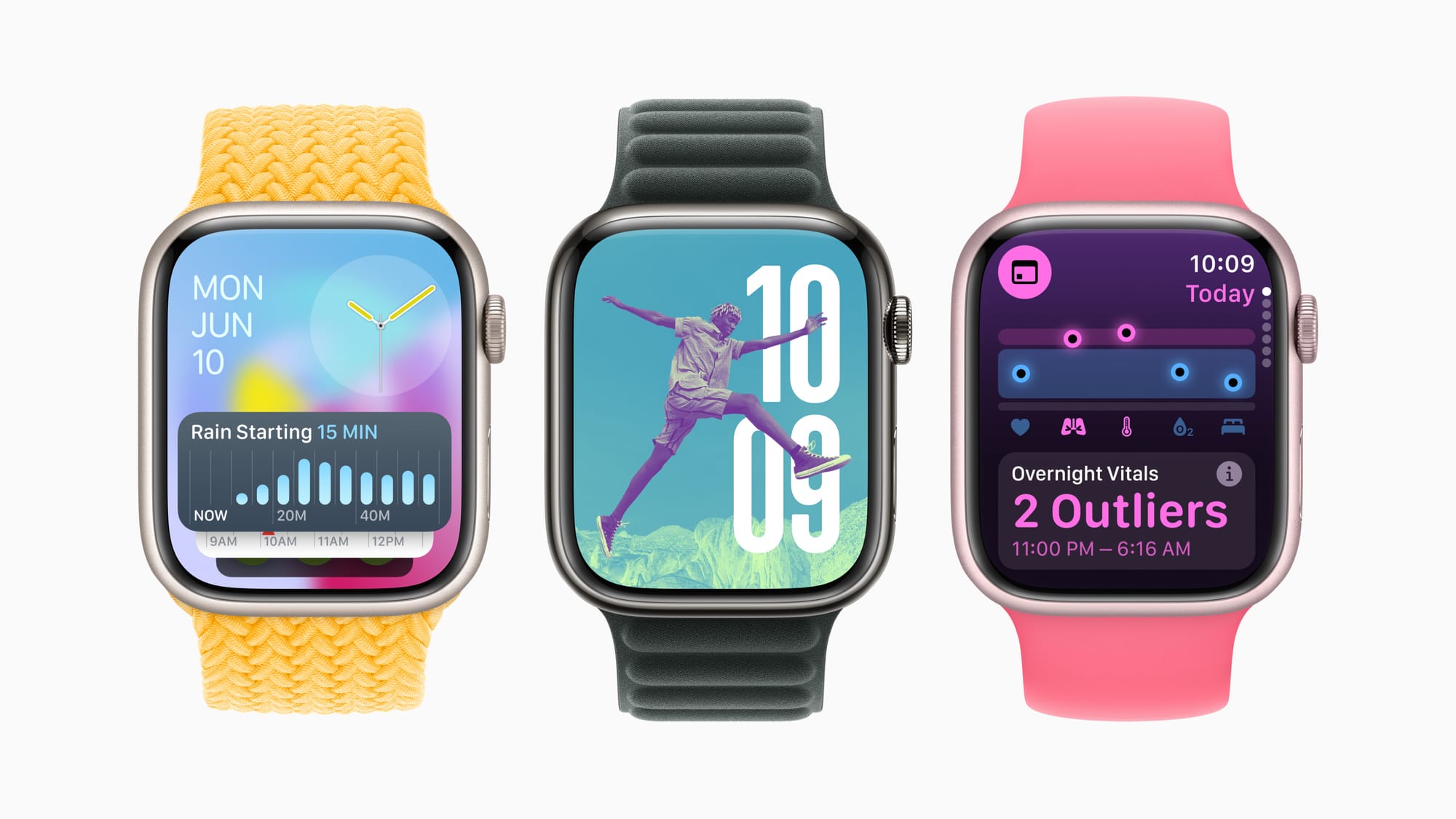
<p>은 사용자의 건강 및 피트니스에 관한 혁신적인 통찰과 그 어느 때보다 다채로운 개인화 역량을 선사한다. 새로운 활력 징후 앱은 주요 건강 지표와 이에 관련된 정보를 제공하고, 운동량 측정 기능은 체력 및 수행 능력 향상을 위해 운동하는 이들에게 획기적인 새로운 경험을 선사하며, 인기 있는 활동 링은 더욱 유연하게 사용자화할 수 있다. 스마트 스택과 사진 페이스는 인텔리전스를 사용해 더 많은 개인 맞춤형 경험을 선사하며, iPhone, iPad의 건강 앱과 Apple Watch는 임산부 사용자를 위한 추가 지원을 제공한다. 체크인, 번역 앱, 더블 탭 제스처를 활용한 새로운 기능이 Apple Watch에 도입되어 향상된 연결성과 편의성을 제공한다.</p>

<p><img src="/assets/images/3/img_5.jpg" alt="" /></p>

<h2 id="applevisionpro에-새로운-공간-컴퓨팅-경험을-도입하는-visionos-2">Apple Vision Pro에 새로운 공간 컴퓨팅 경험을 도입하는 visionOS 2</h2>
<!-- 파일 위치: _includes/auto-link.html -->

<!-- 1. 비어있는 카드 UI 뼈대 -->
<div class="custom-link-card auto-link-wrapper" onclick="window.open('https://www.apple.com/newsroom/2024/06/visionos-2-brings-new-spatial-computing-experiences-to-apple-vision-pro/', '_blank')" style="cursor: pointer;">
  <div class="link-card-image"></div>
  <div class="link-card-content">
    <div class="link-card-title">링크 정보를 불러오는 중...</div>
    <div class="link-card-desc">https://www.apple.com/newsroom/2024/06/visionos-2-brings-new-spatial-computing-experiences-to-apple-vision-pro/</div>
    <div class="link-card-domain"></div>
  </div>
</div>

<!-- 2. 정보를 긁어오는 자바스크립트 로직 -->
<script>
  (function() {
    const targetUrl = "https://www.apple.com/newsroom/2024/06/visionos-2-brings-new-spatial-computing-experiences-to-apple-vision-pro/";
    const currentScript = document.currentScript;
    const cardElement = currentScript.previousElementSibling;
    
    const titleEl = cardElement.querySelector('.link-card-title');
    const descEl = cardElement.querySelector('.link-card-desc');
    const imgEl = cardElement.querySelector('.link-card-image');
    const domainEl = cardElement.querySelector('.link-card-domain');

    try {
      domainEl.innerText = new URL(targetUrl).hostname.replace('www.', '');
    } catch(e) {}

    fetch(`https://api.microlink.io?url=${encodeURIComponent(targetUrl)}`)
      .then(res => res.json())
      .then(data => {
        if(data.status === 'success') {
          const info = data.data;
          if(info.title) titleEl.innerText = info.title;
          if(info.description) descEl.innerText = info.description;
          
          if(info.image && info.image.url) {
            imgEl.style.backgroundImage = `url('${info.image.url}')`;
          } else if(info.logo && info.logo.url) {
            imgEl.style.backgroundImage = `url('${info.logo.url}')`;
          }
        } else {
          titleEl.innerText = "해당 웹사이트로 이동하기";
        }
      })
      .catch(err => {
        titleEl.innerText = "해당 웹사이트로 이동하기";
      });
  })();
</script>

<!-- 3. 링크 카드 CSS 디자인 -->
<style>
  .custom-link-card {
    display: flex;
    border: 1px solid #e1e4e8;
    border-radius: 6px;
    overflow: hidden;
    text-decoration: none !important;
    color: inherit !important;
    margin: 2rem 0;
    background-color: #ffffff;
    transition: box-shadow 0.2s ease;
    height: 192px; 
  }
  
  .custom-link-card:hover {
    box-shadow: 0 4px 12px rgba(0,0,0,0.1);
  }
  
  .link-card-image {
    width: 192px; 
    height: 192px;
    flex-shrink: 0;
    background-size: cover;
    background-position: center;
    background-color: #f6f8fa;
    border-right: 1px solid #e1e4e8;
  }
  
  .link-card-content {
    display: flex;
    flex-direction: column;
    justify-content: flex-start; /* 🌟 기존 center를 제거하고 위쪽 정렬로 변경합니다 🌟 */
    padding: 1.5rem; /* 🌟 상, 하, 좌, 우 여백을 모두 1.5rem으로 완벽하게 통일합니다 🌟 */
    overflow: hidden;
    flex: 1;
  }
  
  .link-card-title {
    font-weight: normal; 
    font-size: 1.05rem;
    line-height: 1.4; 
    margin-bottom: 0.5rem; /* 타이틀과 내용물 사이의 간격은 그대로 유지됩니다 */
    white-space: nowrap;
    overflow: hidden;
    text-overflow: ellipsis;
    color: #24292e;
  }
  
  .link-card-desc {
    font-size: 0.68rem; 
    line-height: 1.6;
    color: #586069;
    margin-bottom: 0.8rem;
    display: -webkit-box;
    -webkit-line-clamp: 2; 
    -webkit-box-orient: vertical;
    overflow: hidden;
  }
  
  .link-card-domain {
    font-size: 0.6rem; 
    color: #959da5;
    text-transform: lowercase;
    margin-top: auto; /* 🌟 남는 공간을 위쪽으로 다 밀어내서 도메인을 박스 맨 아래(1.5rem 여백 위치)에 딱 붙입니다 🌟 */
  }
  
  /* 모바일 환경 대응 */
  @media (max-width: 600px) {
    .custom-link-card {
      flex-direction: column;
      height: auto;
    }
    .link-card-image {
      width: 100%;
      height: auto;
      aspect-ratio: 1 / 1; 
      border-right: none;
      border-bottom: 1px solid #e1e4e8;
    }
  }
</style>

<p>첫 출시 이후 단 몇 달 만에 공개된 후속 체제인  visionOS 2 는 Apple Vision Pro에 강력한 공간 컴퓨팅 경험을 도입한다. 이를 통해 사용자는 보관함에 있는 이미지로 공간 사진을 만들 수 있고, 직관적인 제스처로 중요한 정보에 손쉽게 접근해 한눈에 파악할 수 있으며, Mac을 위한 가상 디스플레이, 여행 모드, 방문 사용자와 같은 신규 기능을 만나볼 수 있다. visionOS 2는 마음 챙기기 앱에 Follow Your Breathing이라는 놀라운 신규 기능을 선사하고, 사진 앱에 SharePlay와 TV 앱에 멀티뷰 기능을 추가한다.</p>

<h2 id="한층-향상된-엔터테인먼트-경험과-편리성을-선사하는-홈-및-오디오-업데이트">한층 향상된 엔터테인먼트 경험과 편리성을 선사하는 홈 및 오디오 업데이트</h2>

<!-- 파일 위치: _includes/auto-link.html -->

<!-- 1. 비어있는 카드 UI 뼈대 -->
<div class="custom-link-card auto-link-wrapper" onclick="window.open('https://www.apple.com/newsroom/2024/06/updates-to-the-home-experience-elevate-entertainment-and-bring-more-convenience/', '_blank')" style="cursor: pointer;">
  <div class="link-card-image"></div>
  <div class="link-card-content">
    <div class="link-card-title">링크 정보를 불러오는 중...</div>
    <div class="link-card-desc">https://www.apple.com/newsroom/2024/06/updates-to-the-home-experience-elevate-entertainment-and-bring-more-convenience/</div>
    <div class="link-card-domain"></div>
  </div>
</div>

<!-- 2. 정보를 긁어오는 자바스크립트 로직 -->
<script>
  (function() {
    const targetUrl = "https://www.apple.com/newsroom/2024/06/updates-to-the-home-experience-elevate-entertainment-and-bring-more-convenience/";
    const currentScript = document.currentScript;
    const cardElement = currentScript.previousElementSibling;
    
    const titleEl = cardElement.querySelector('.link-card-title');
    const descEl = cardElement.querySelector('.link-card-desc');
    const imgEl = cardElement.querySelector('.link-card-image');
    const domainEl = cardElement.querySelector('.link-card-domain');

    try {
      domainEl.innerText = new URL(targetUrl).hostname.replace('www.', '');
    } catch(e) {}

    fetch(`https://api.microlink.io?url=${encodeURIComponent(targetUrl)}`)
      .then(res => res.json())
      .then(data => {
        if(data.status === 'success') {
          const info = data.data;
          if(info.title) titleEl.innerText = info.title;
          if(info.description) descEl.innerText = info.description;
          
          if(info.image && info.image.url) {
            imgEl.style.backgroundImage = `url('${info.image.url}')`;
          } else if(info.logo && info.logo.url) {
            imgEl.style.backgroundImage = `url('${info.logo.url}')`;
          }
        } else {
          titleEl.innerText = "해당 웹사이트로 이동하기";
        }
      })
      .catch(err => {
        titleEl.innerText = "해당 웹사이트로 이동하기";
      });
  })();
</script>

<!-- 3. 링크 카드 CSS 디자인 -->
<style>
  .custom-link-card {
    display: flex;
    border: 1px solid #e1e4e8;
    border-radius: 6px;
    overflow: hidden;
    text-decoration: none !important;
    color: inherit !important;
    margin: 2rem 0;
    background-color: #ffffff;
    transition: box-shadow 0.2s ease;
    height: 192px; 
  }
  
  .custom-link-card:hover {
    box-shadow: 0 4px 12px rgba(0,0,0,0.1);
  }
  
  .link-card-image {
    width: 192px; 
    height: 192px;
    flex-shrink: 0;
    background-size: cover;
    background-position: center;
    background-color: #f6f8fa;
    border-right: 1px solid #e1e4e8;
  }
  
  .link-card-content {
    display: flex;
    flex-direction: column;
    justify-content: flex-start; /* 🌟 기존 center를 제거하고 위쪽 정렬로 변경합니다 🌟 */
    padding: 1.5rem; /* 🌟 상, 하, 좌, 우 여백을 모두 1.5rem으로 완벽하게 통일합니다 🌟 */
    overflow: hidden;
    flex: 1;
  }
  
  .link-card-title {
    font-weight: normal; 
    font-size: 1.05rem;
    line-height: 1.4; 
    margin-bottom: 0.5rem; /* 타이틀과 내용물 사이의 간격은 그대로 유지됩니다 */
    white-space: nowrap;
    overflow: hidden;
    text-overflow: ellipsis;
    color: #24292e;
  }
  
  .link-card-desc {
    font-size: 0.68rem; 
    line-height: 1.6;
    color: #586069;
    margin-bottom: 0.8rem;
    display: -webkit-box;
    -webkit-line-clamp: 2; 
    -webkit-box-orient: vertical;
    overflow: hidden;
  }
  
  .link-card-domain {
    font-size: 0.6rem; 
    color: #959da5;
    text-transform: lowercase;
    margin-top: auto; /* 🌟 남는 공간을 위쪽으로 다 밀어내서 도메인을 박스 맨 아래(1.5rem 여백 위치)에 딱 붙입니다 🌟 */
  }
  
  /* 모바일 환경 대응 */
  @media (max-width: 600px) {
    .custom-link-card {
      flex-direction: column;
      height: auto;
    }
    .link-card-image {
      width: 100%;
      height: auto;
      aspect-ratio: 1 / 1; 
      border-right: none;
      border-bottom: 1px solid #e1e4e8;
    }
  }
</style>

<p>에는 InSight를 비롯한 스마트한 신규 기능과 대화 강조 및 자막 관련 업데이트가 도입되어 더욱 높은 수준의 뛰어난 시네마틱 경험을 선사하는 한편, Apple Music 및 FaceTime의 다양한 기능도 새로 추가되어 사용자의 가장 큰 화면에서 더욱 향상된 경험을 제공한다. iOS 18으로 홈 앱에도 방문자 접근과 핸즈프리 잠금 해제 등 새로운 기능이 추가되어 더욱 안전하고 편리하게 집을 출입할 수 있다. AirPods 소프트웨어 업데이트는 사용자가 Siri에 새로운 제스처로 답하고 친구나 사랑하는 이들과 통화를 하고 좋아하는 게임에 빠져드는 방식에 일대 혁신을 가져온다.</p>

<p>출처 :</p>

<!-- 파일 위치: _includes/auto-link.html -->

<!-- 1. 비어있는 카드 UI 뼈대 -->
<div class="custom-link-card auto-link-wrapper" onclick="window.open('https://www.apple.com/kr/newsroom/2024/06/wwdc24-highlights/', '_blank')" style="cursor: pointer;">
  <div class="link-card-image"></div>
  <div class="link-card-content">
    <div class="link-card-title">링크 정보를 불러오는 중...</div>
    <div class="link-card-desc">https://www.apple.com/kr/newsroom/2024/06/wwdc24-highlights/</div>
    <div class="link-card-domain"></div>
  </div>
</div>

<!-- 2. 정보를 긁어오는 자바스크립트 로직 -->
<script>
  (function() {
    const targetUrl = "https://www.apple.com/kr/newsroom/2024/06/wwdc24-highlights/";
    const currentScript = document.currentScript;
    const cardElement = currentScript.previousElementSibling;
    
    const titleEl = cardElement.querySelector('.link-card-title');
    const descEl = cardElement.querySelector('.link-card-desc');
    const imgEl = cardElement.querySelector('.link-card-image');
    const domainEl = cardElement.querySelector('.link-card-domain');

    try {
      domainEl.innerText = new URL(targetUrl).hostname.replace('www.', '');
    } catch(e) {}

    fetch(`https://api.microlink.io?url=${encodeURIComponent(targetUrl)}`)
      .then(res => res.json())
      .then(data => {
        if(data.status === 'success') {
          const info = data.data;
          if(info.title) titleEl.innerText = info.title;
          if(info.description) descEl.innerText = info.description;
          
          if(info.image && info.image.url) {
            imgEl.style.backgroundImage = `url('${info.image.url}')`;
          } else if(info.logo && info.logo.url) {
            imgEl.style.backgroundImage = `url('${info.logo.url}')`;
          }
        } else {
          titleEl.innerText = "해당 웹사이트로 이동하기";
        }
      })
      .catch(err => {
        titleEl.innerText = "해당 웹사이트로 이동하기";
      });
  })();
</script>

<!-- 3. 링크 카드 CSS 디자인 -->
<style>
  .custom-link-card {
    display: flex;
    border: 1px solid #e1e4e8;
    border-radius: 6px;
    overflow: hidden;
    text-decoration: none !important;
    color: inherit !important;
    margin: 2rem 0;
    background-color: #ffffff;
    transition: box-shadow 0.2s ease;
    height: 192px; 
  }
  
  .custom-link-card:hover {
    box-shadow: 0 4px 12px rgba(0,0,0,0.1);
  }
  
  .link-card-image {
    width: 192px; 
    height: 192px;
    flex-shrink: 0;
    background-size: cover;
    background-position: center;
    background-color: #f6f8fa;
    border-right: 1px solid #e1e4e8;
  }
  
  .link-card-content {
    display: flex;
    flex-direction: column;
    justify-content: flex-start; /* 🌟 기존 center를 제거하고 위쪽 정렬로 변경합니다 🌟 */
    padding: 1.5rem; /* 🌟 상, 하, 좌, 우 여백을 모두 1.5rem으로 완벽하게 통일합니다 🌟 */
    overflow: hidden;
    flex: 1;
  }
  
  .link-card-title {
    font-weight: normal; 
    font-size: 1.05rem;
    line-height: 1.4; 
    margin-bottom: 0.5rem; /* 타이틀과 내용물 사이의 간격은 그대로 유지됩니다 */
    white-space: nowrap;
    overflow: hidden;
    text-overflow: ellipsis;
    color: #24292e;
  }
  
  .link-card-desc {
    font-size: 0.68rem; 
    line-height: 1.6;
    color: #586069;
    margin-bottom: 0.8rem;
    display: -webkit-box;
    -webkit-line-clamp: 2; 
    -webkit-box-orient: vertical;
    overflow: hidden;
  }
  
  .link-card-domain {
    font-size: 0.6rem; 
    color: #959da5;
    text-transform: lowercase;
    margin-top: auto; /* 🌟 남는 공간을 위쪽으로 다 밀어내서 도메인을 박스 맨 아래(1.5rem 여백 위치)에 딱 붙입니다 🌟 */
  }
  
  /* 모바일 환경 대응 */
  @media (max-width: 600px) {
    .custom-link-card {
      flex-direction: column;
      height: auto;
    }
    .link-card-image {
      width: 100%;
      height: auto;
      aspect-ratio: 1 / 1; 
      border-right: none;
      border-bottom: 1px solid #e1e4e8;
    }
  }
</style>

<p><img src="/assets/images/3/img_6.jpg" alt="" /></p>]]></content><author><name>haanss</name></author><category term="News" /><category term="Apple" /><summary type="html"><![CDATA[다시 한번 만나보는 WWDC24의 주요 순간들]]></summary></entry><entry><title type="html">Merry Christmas</title><link href="https://la-bohe.me/7/" rel="alternate" type="text/html" title="Merry Christmas" /><published>2025-08-28T11:06:56+00:00</published><updated>2025-08-28T11:06:56+00:00</updated><id>https://la-bohe.me/7</id><content type="html" xml:base="https://la-bohe.me/7/"><![CDATA[<p>모두 행복한 크리스마스</p>

<h2 id="merry-christmas">Merry Christmas</h2>

<p><img src="/assets/images/7/IMG_1047.JPG" alt="" /></p>

<blockquote>
  <p>Nikon D700 / MF 50mm 1.4<br />
@seoul | December. 2015</p>
</blockquote>

<p>모두 행복한 크리스마스 보내세요.</p>]]></content><author><name>haanss</name></author><category term="Photo" /><category term="Nikon" /><category term="D700" /><category term="50mm" /><category term="크리스마스" /><summary type="html"><![CDATA[모두 행복한 크리스마스]]></summary></entry></feed>